
Please note that the document is only intended for Lazarus & Google Gemini Integration and not for MoneyThumb or Ocrolus/Ocrolus Instant.
The purpose of this page is to provide a clear and actionable checklist of the essential steps that must be completed after a Salesforce sandbox refresh. A sandbox refresh resets the environment to match production data, but it can impact certain configurations and user settings. This guide ensures that all necessary actions—such as license reassignment, template validation, and mapping verification—are properly performed to maintain the functionality and integrity of the system. Following these steps will help prevent disruptions and ensure a smooth transition back to normal sandbox operations.
1. Before Refresh
During a sandbox refresh, Salesforce only includes metadata and data based on the configuration defined in the Sandbox Template. This means that any objects or records not explicitly included in the template will not be copied into the refreshed sandbox.
Selecting the appropriate objects within the Sandbox Template before initiating the refresh is essential to ensure proper functionality and environment setup.
Action Required: Please make sure the following objects are selected in the Sandbox Template to retain necessary configurations and test data:
-
Document Insight Template (only for Lazarus Integration)
Click here to refer to Salesforce documentation on creating or editing the Sandbox Template.
2. Verify or Reconfigure Document Insight Template
✅ If Step #1 was completed successfully: Proceed to Step 2.1.
❗ If Step #1 was not completed or there were issues: Skip to Step 2.2 to resolve outstanding items.
2.1 Verify Data and Mappings
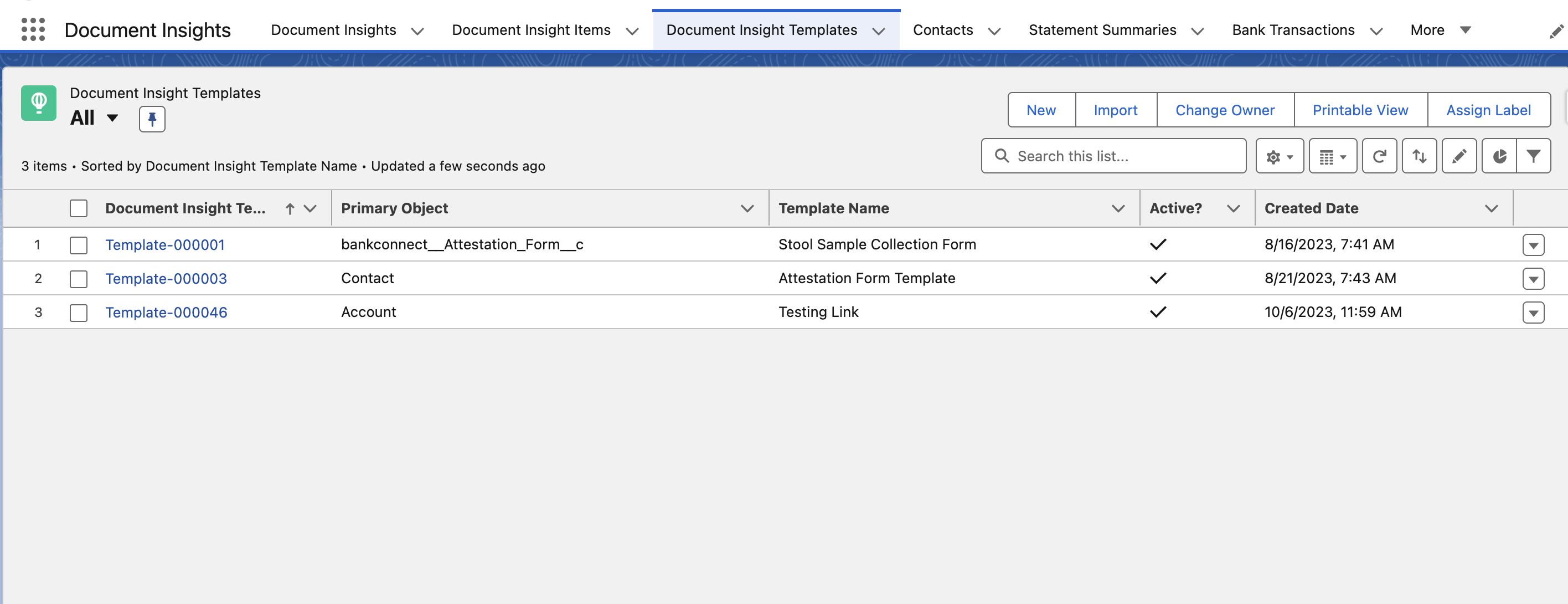
✅ 2.1.1 Document Insight Template
Go to Custom Field Mappings and confirm that all mappings are available.
✅ 2.1.2 Custom Forms Test
Run a test case to ensure custom forms are parsed and records are created/updated accurately using the restored mappings.
2.2 Reconfigure the Document Insight tempates
Please follow Step 7 in the below document.
https://cloudmaven.atlassian.net/wiki/external/MGQwOGIwMTQ4ZjZjNGY5YTkzOTMyM2UyZTI1MzExNWU
🚀 Support
If you encounter any issues or need assistance, 📧 support@cloudmaveninc.com