
Document Insights — Product Overview
Document Insights, built by Cloud Maven, Inc., is an AI-powered document intelligence platform that lives inside Salesforce. It reads your financial, identity, tax, and custom business documents, turns them into structured data, and surfaces the insights your teams need to make decisions — without manual data entry.
It is designed for the people who work with documents every day: underwriters, analysts, operations, compliance, and business teams. If your work involves reviewing bank statements, verifying identities, checking income, or processing forms, Document Insights does the reading and extraction for you so you can focus on the decision.
💼 Why Document Insights
Document Insights is built to move you from document to decision faster, with fewer people and fewer errors.
-
Cut manual review. Documents are read and extracted automatically instead of keyed in by hand.
-
Lower cost and turnaround time. Less manual processing means faster onboarding and underwriting.
-
Improve accuracy and compliance. Consistent extraction and confidence scoring reduce human error and create an auditable trail.
-
Catch fraud earlier. Anomaly and tampering detection flag risk before it reaches a decision.
-
Keep everything in Salesforce. Insights land on your existing records — no separate system to learn or maintain.
Whether you are a fintech, lender, operations team, healthcare provider, or compliance-focused organization, Document Insights helps fast-track your document-to-decision pipeline.
✨ What Document Insights Does
At its core, the platform handles four things:
-
Reads documents — extracts data from bank statements, credit card statements, identity documents, tax forms, income proofs, and custom forms.
-
Understands unstructured documents — pulls information from almost any document using a simple prompt, with no predefined template required.
-
Brings data to your records — extracted fields land directly on the records and processes your team already relies on.
-
Surfaces insights — revenue, cash flow, average balance, NSF days, fraud scores, and transaction summaries, visualized in built-in dashboards.
🔄 How It Works
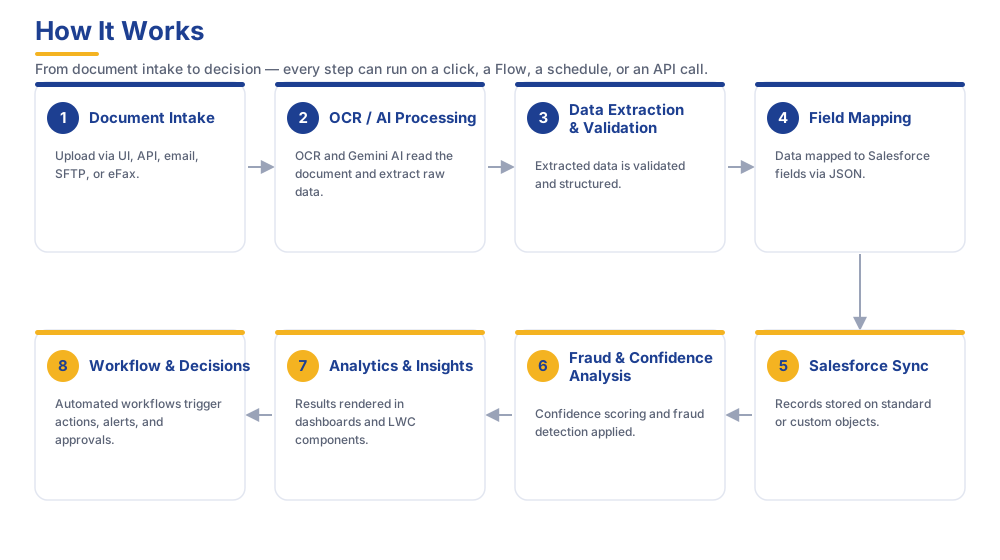
A document moves through the platform on a simple, automated path:
-
Upload — add a document, or let it arrive automatically.
-
Process — the platform reads it.
-
Extract & validate — data is pulled and checked.
-
Sync — your records update automatically.
-
Analyze — fraud and confidence scoring run.
-
Visualize — analytics appear in dashboards.
-
Act — workflows and approvals move the decision forward.
Processing can run on demand or automatically, so it fits the way your team already works.
📦 Feature Reference
|
Capability |
What It Means for You |
|---|---|
|
Flexible processing |
Run extraction on demand or have it happen automatically |
|
AI-powered reading |
Accurate extraction even from messy or unstructured documents |
|
Broad document coverage |
Bank & credit card statements, custom forms, identity documents, tax forms, income proofs |
|
Data on your records |
Extracted information lands where your team already works |
|
Decision-ready insights |
Revenue, overdrafts, average balance, fraud scores, transaction summaries |
|
Fraud detection |
Flags inconsistencies that signal tampering or risk |
|
Built-in dashboards |
Analytics ready to view, with no setup required |
|
Review workflow |
Confidence scoring and review queues so people focus on what needs a human |
|
Secure, compliant handling |
Controlled access and an auditable trail |
|
Grows with you |
Handles everything from a small team to enterprise volumes |
🔌 What It Connects With
Document Insights works with leading OCR and AI services, so you get the right capability for each kind of document:
-
MoneyThumb — bank and credit card statement analysis, cash flow, and fraud scoring
-
Ocrolus — bank statement, identity, and income document reading with authenticity scoring
-
Lazarus — custom and business-specific form parsing
-
Google Gemini — prompt-based extraction from virtually any document, no template needed
For setup details and the full capability list of each provider, see the Integrations guide.
🎯 Built to Grow With You
The platform adapts as your needs change — usually with simple configuration rather than a project. You can add new document types, adjust how information lands on your records, build dashboard views, and set the review rules that match your risk tolerance. As your volumes grow, the platform scales to keep up.
👉 What's Next
-
New to the platform? Start with the User Guide to process your first document.
-
Setting up your org? See the Admin Guide.
-
Connecting external systems? Head to the API Guide.
⚙️ Contact
Need help? Contact support at support@cloudmaveninc.com.