
This page outlines the key custom objects (sObjects) used in the Payment Connect application. These objects are grouped by purpose: setup configuration, workflow tracking. Understanding these objects helps in managing, customizing, and integrating the solution efficiently within your Salesforce org.
🔄 1. Schema ERD
The following objects serve as the primary entities in the Payment Connect app.
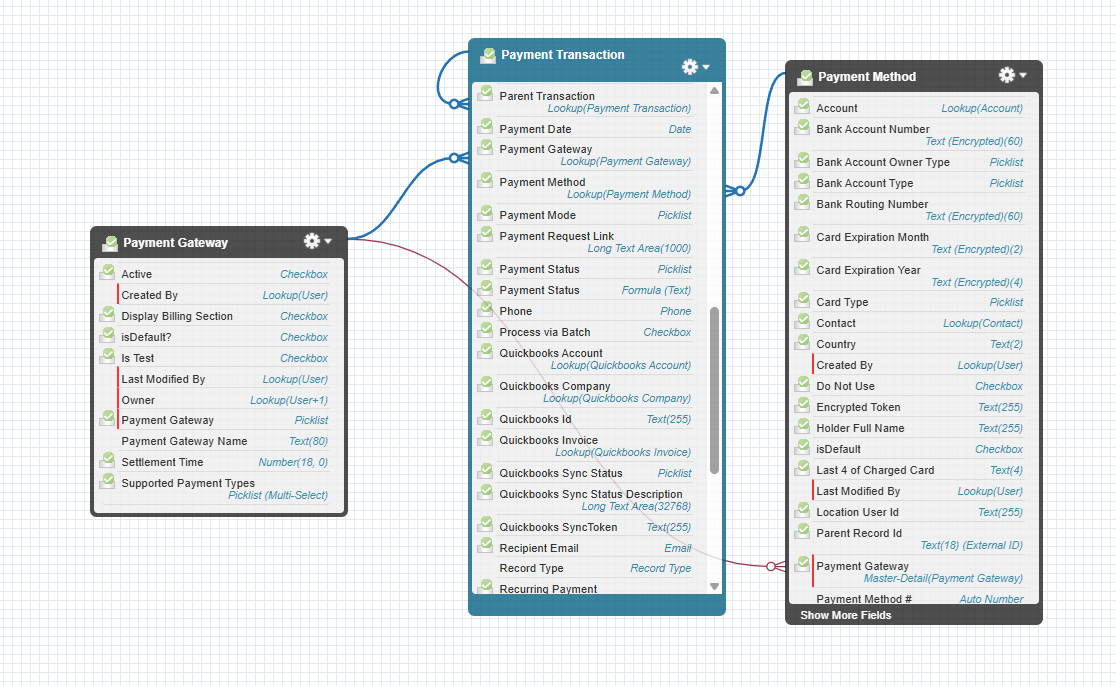
|
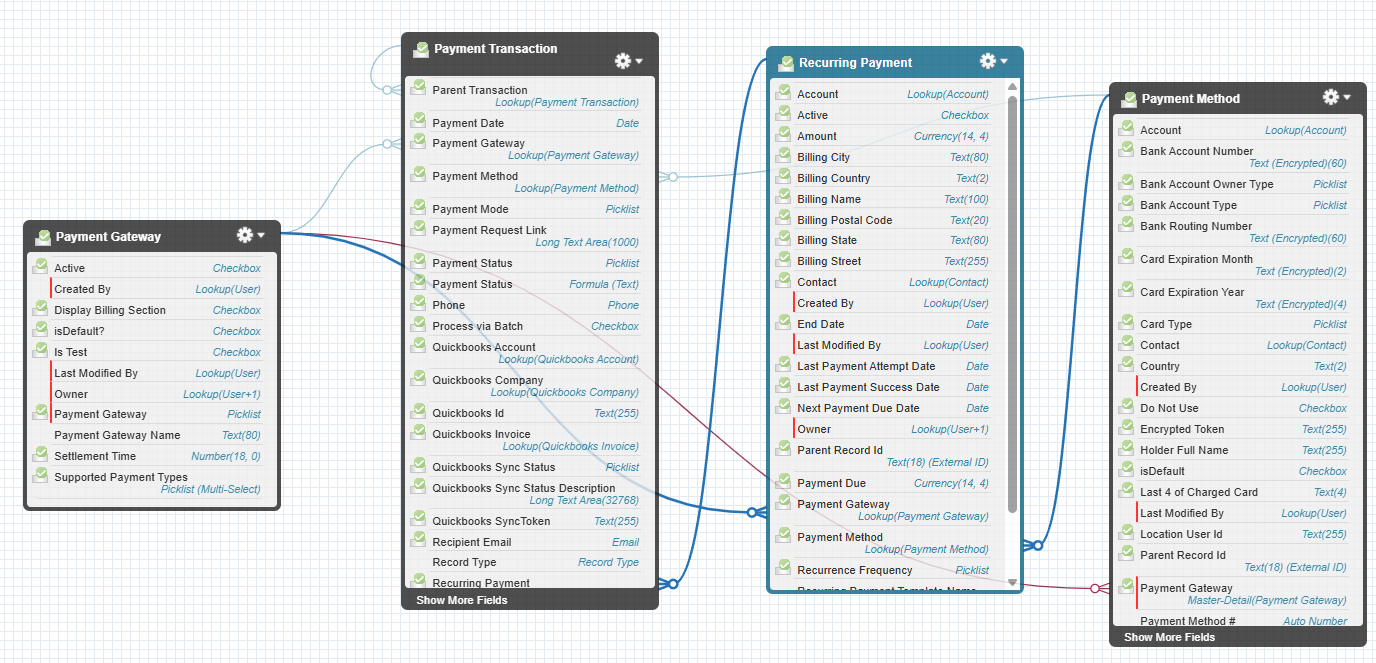
These object are configure in a Recurring payment |
|---|
⚙️ 2. Setup Objects
|
Object Name |
API Name |
Usage |
|---|---|---|
|
Payment Gateway |
|
This object stores the configuration of a gateway used to make payments. By opening a record, users can set the gateway credentials that are used during payment processing. |
|
Payment Transaction |
|
This object stores all data related to a transaction, including date, amount, payment method, billing information, and status. It also captures any error messages if the transaction fails. |
|
Payment Method |
|
Stores information about Credit Cards, Debit Cards, and ACH Bank Accounts in tokenized form for PCI compliance. Linked to a Payment Gateway, these methods can be reused to process charge transactions. |
|
Recurring Payment |
|
This object is used to handle recurring payments. It stores the frequency, amount, payment method, and other configuration fields needed to automate and track recurring transactions. |
2.1 Payment Gateway
The Payment Gateway object in Payment Connect is used to configure and manage settings for various payment gateways integrated within the application. Each record represents a gateway configuration that controls how payments are processed through that gateway.
2.1.1 Key Fields
|
Field Label |
API Name |
Description / Usage |
|---|---|---|
|
Supported Payment Types |
|
Specifies which payment methods are supported by the gateway (e.g., Card or ACH). |
|
Payment Gateway |
|
Identifies which gateway integration is used (e.g., Actum, Fiserv, or UnityFi). |
|
Payment Gateway Name |
|
Name or label for the specific gateway configuration (e.g., Actum_Prod). |
|
Settlement Time |
|
Indicates the estimated number of days it takes for transactions to settle (e.g., 3 Days). |
|
Supported Processing Frequency |
|
Defines the processing frequency or payment speed supported by the gateway (e.g., Regular, Same Day, Instant). |
|
Display Billing Section |
|
Checkbox field that determines whether the billing address section is shown during card payments. |
2.1.2 Gateway Credentials Management
Each Payment Gateway record allows administrators to configure and link credentials specific to that gateway.
Credentials are securely stored in a protected Custom Setting, ensuring sensitive data such as API keys, usernames, or passwords remain accessible only to authorized components.
2.2 Payment Transaction
The Payment Transaction object in Payment Connect records every payment event that occurs through the application.
Each record represents either a credit (payout/disbursement) or debit (payment collection) transaction processed via a connected payment gateway.
2.2.1 Key Fields
|
Field Label |
API Name |
Description / Usage |
|---|---|---|
|
Amount |
|
The total amount requested to be captured or sent. |
|
Amount Captured |
|
The actual amount successfully captured or sent. This field reflects the net captured value after any partial refunds. |
|
Amount Refunded |
|
Indicates how much of the original captured amount has been refunded. |
|
Gateway Message |
|
Displays response messages from the payment gateway, including transaction status updates or error details. |
|
Parent Record Id |
|
References the Salesforce record (e.g., Opportunity, Account, Contact) associated with this transaction. |
|
Payment Date |
|
The date on which the transaction is or will be processed. For scheduled payments, this reflects the future payment date. |
|
Payment Gateway |
|
Identifies the gateway through which the transaction was processed (e.g., Actum, Fiserv, UnityFi). |
|
Payment Method |
|
References the payment method used for the transaction. This value is stored in a double-encrypted format for enhanced security. |
|
Payment Status |
|
Indicates the current status of the transaction (e.g., Accepted, Settled, Returned). |
|
Return Date |
|
Date on which the transaction of returned by the bank. |
|
Return Code |
|
Standard Return code telling that why the transaction for returned. |
|
Transaction Type |
|
Specifies whether the transaction is a Credit (outgoing payment) or Debit (incoming payment). |
|
Transaction Id |
|
Gateway-generated unique reference ID used to track and reconcile transactions at the payment processor level. |
2.2.2. Record Creation
A Payment Transaction record is automatically created whenever a payment is initiated through the Payment Request or Payment Console.
-
Debit transactions are generated for payment collections.
-
Credit transactions are created for payouts or refunds.
2.3 Payment Method
The Payment Method object in Payment Connect stores secure, tokenized information about the customer’s Credit Cards, Debit Cards, or ACH Bank Accounts used to process payments through integrated gateways.
Instead of storing raw card or bank details, the system saves encrypted tokens provided by the payment gateway, ensuring full PCI compliance.
Each Payment Method record is linked to a Payment Gateway and can be used to create charge transactions within the application.
2.3.1 Key Fields
|
Field Label |
API Name |
Description / Usage |
|---|---|---|
|
Bank Account Type |
|
Specifies the account type for ACH payments (e.g., Savings or Checking). |
|
Card Expiration Month |
|
Month when the stored card expires. |
|
Card Expiration Year |
|
Year when the stored card expires. |
|
Card Type |
|
Identifies the card network or type (e.g., Visa, Mastercard). |
|
Encrypted Token |
|
Tokenized and double-encrypted reference used to process payments securely without exposing sensitive details. |
|
Holder Full Name |
|
Full name of the cardholder or bank account owner. |
|
Last 4 of Charged Card |
|
The last four digits of the card or account number, used for display and differentiation. |
|
Payment Gateway |
|
Identifies which gateway this payment method is registered with and can be used through. |
|
Payment Mode |
|
Indicates whether the method is a Card or ACH (Pay by Bank) payment type. |
|
Status |
|
Reflects the current validity of the payment method (e.g., Active, Expired). |
2.3.2 Usage
-
Payment Methods can be saved during a transaction for future use or linked directly to a customer record.
-
When processing a payment, the system retrieves the Encrypted Token to perform the transaction via the associated Payment Gateway.
-
Expired or inactive methods are automatically excluded from available payment options.
-
2.4 Recurring Payment
The Recurring Payment object in Payment Connect is used to manage and track payments that are scheduled to be automatically captured at defined intervals — such as weekly, monthly, or custom frequencies.
A record is created whenever a recurring payment plan is set up for a customer or a linked Salesforce record (e.g., Opportunity, Account, Case, or any custom object).
2.4.1 Key Fields
|
Field Label |
API Name |
Description / Usage |
|---|---|---|
|
Amount |
|
The amount to be captured during each recurring cycle. |
|
Start Date |
|
The date from which the recurring payment schedule begins. |
|
End Date |
|
The final date until which the recurring payments will be captured. |
|
Last Payment Attempt Date |
|
Date on which the last payment capture attempt was made, regardless of whether it was successful or failed. |
|
Last Payment Success Date |
|
Date on which the most recent payment capture attempt was successfully processed. |
|
Next Payment Due Date |
|
Date on which the next scheduled payment will be captured as part of the recurring payment cycle. |
|
Parent Record Id |
|
The Salesforce record (standard or custom) associated with this recurring payment setup. |
|
Payment Due |
|
The amount currently due as a result of previously failed or missed transactions. |
|
Payment Gateway |
|
Identifies which payment gateway will process all recurring transactions for this record. |
|
Payment Method |
|
The card or bank account (tokenized) that will be used to capture each recurring payment. |
|
Recurrence Frequency |
|
Defines how often the payment should occur (e.g., Weekly, Monthly, Quarterly). |
|
Scheduled Date |
|
The date on which the recurring payment setup was initially created. |
2.4.2 Usage
-
Recurring Payment records are automatically created when a user schedules a payment through the Payment Console or related workflow.
-
The system processes payments based on the defined Recurrence Frequency, using the specified Payment Gateway and Payment Method.
-
If any transaction fails, the Payment Due field reflects the pending balance, which can be retried in subsequent cycles.