
Overview
Version 1.20 strengthens DocGen & eSign with a stronger focus on security and compliance. It introduces eOriginal Vaulting and Digital Signatures to help preserve document authenticity, integrity, and legal validity. The release also improves the user experience with a clearer Signer Mapping workflow and a smoother End-Signer journey.
eOriginal Vaulting Integration
DocGen & eSign now partners with eOriginal — the industry leader in secure digital vaulting — to help organizations meet compliance and regulatory requirements by preserving signed documents as authoritative originals in a secure, tamper-proof vault.
✳️ Key Highlights
-
Compliance & Legal Validity: Signed documents are vaulted in eOriginal to maintain legal enforceability and digital integrity.
-
Configurable Deployment: Vaulting can be activated at the Template or Org level, offering flexibility for both enterprise-wide and case-specific control.
-
Authoritative Copy Management:
-
During the signature process, DocGen & eSign maintains the authoritative copy.
-
Upon completion, the document is securely transferred to eOriginal.
-
A read-only reference PDF remains in DocGen & eSign, automatically watermarked as “Copy of Original.”
-
⚙️ Configuration
Administrators can enable vaulting at:
-
Org Level: Vault all completed documents by default.
-
Template Level: Selectively enable vaulting for critical agreements or compliance-sensitive workflows.
💡 To activate eOriginal Vaulting or Digital Signature features, please contact our sales team at sales@cloudmaveninc.com.
Enhanced Signer Mapping Experience
The Signer Mapping interface has been completely modernized to make signer setup faster, clearer, and more intuitive.
🧭 What’s New
-
Direct Signer Creation: Add and configure signers directly from the document template.
-
Visual Field Mapping: Easily associate signer fields (e.g., signature, initials, text boxes) through the Document field mapping panel.
-
Reduced Errors: Improved validation ensures every field is correctly linked before sending.
-
Faster Setup: Administrators can configure signers for multiple templates in a fraction of the previous time.
Improved End-Signer Experience
The signing journey for recipients has been redesigned for a smoother, guided experience.
✨ Enhancements
-
Step-by-Step Guidance: Signers are now visually guided through all required signing fields.
-
Reusable Signatures: Once captured, a signer’s signature can be reused automatically across all assigned fields—no need to sign multiple times.
-
Responsive Design: Optimized signing interface across desktop and mobile devices.
-
Upgraded Confirmation UI: A modern, simplified confirmation page provides clear feedback once signing is complete.
Digital Signature (Tamper-Proof Sealing)
Introducing Digital Signature Support, enabling organizations to seal documents cryptographically after the final signature — ensuring authenticity, integrity, and non-repudiation.
🔒 Key Benefits
-
Document Integrity: Prevents any post-signing alterations.
-
Configurable Activation: Can be turned on per Template or at the Org level.
-
Compliant Sealing: Uses industry-standard PKCS#7 digital signatures to ensure legal validity.
-
Audit-Ready: Digital signatures provide timestamped, verifiable evidence of document authenticity.
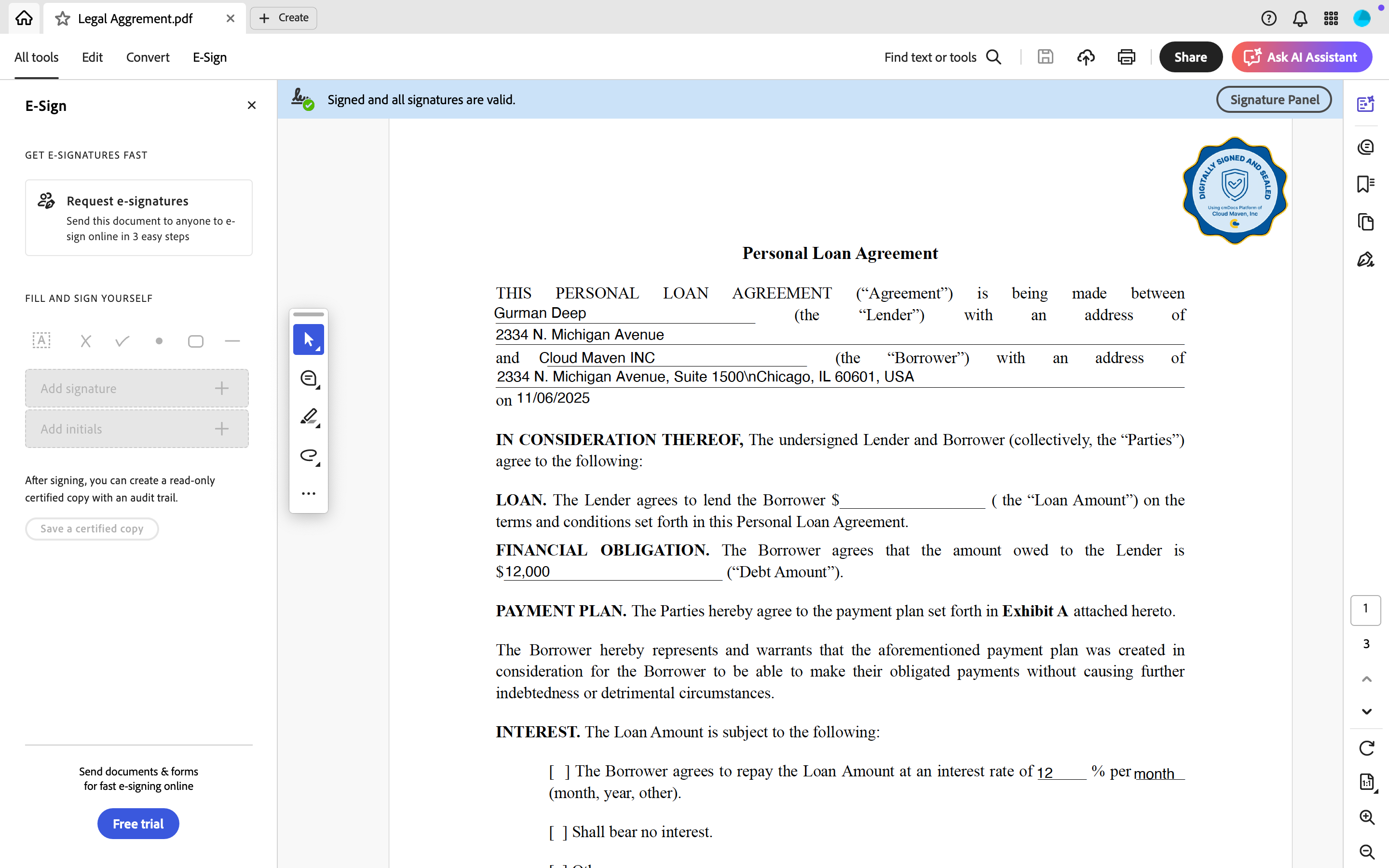
📧 To enable this feature, please contact sales@cloudmaveninc.com.
Envelope Access Tracking
A new audit mechanism now records when each signer first opens the envelope link.
This allows administrators to gain visibility into document engagement and maintain a detailed activity audit trail.
🧩 Benefits
-
Improves compliance tracking and SLA visibility.
-
Enables proactive follow-ups with signers who have not yet accessed the document.
-
Supports comprehensive audit logging for regulatory reporting.
Minor Fixes & Stability Improvements
This release includes several low-impact bug fixes and optimizations reported by subscribers and internal QA teams.
Focus areas:
-
Improved load performance on signer view.
-
Fixed rare UI alignment issues on mobile.
-
Resolved intermittent issues with workflow refresh on completion.
Summary
Version 1.20 represents a major step forward in DocGen & eSign’s journey toward delivering a secure, compliant, and intuitive document automation experience.
From eOriginal Vaulting to enhanced signing and mapping workflows, this update ensures a more reliable, auditable, and user-friendly signing process for all parties.
📞 Contact & Support
For questions, feature enablement, or custom deployment assistance:
-
Email: sales@cloudmaveninc.com
-
Website: www.cloudmaveninc.com
-
Support: support@cloudmaveninc.com