
DocGen & eSign — Product Overview
cmDocs - Document Generation and eSign is a Salesforce-native solution designed to simplify document generation and electronic signature workflows. It enables businesses to generate, send, sign, and track documents directly within Salesforce using real-time CRM data.
With advanced security, compliance features, automation capabilities, and seamless Salesforce integration, cmDocs helps organizations improve efficiency, reduce manual effort, and maintain complete visibility throughout the document lifecycle.
Why DocGen & eSign
DocGen & eSign is built to automate document creation, streamline electronic signature workflows, and securely manage the complete document lifecycle—all without leaving Salesforce.
-
Eliminate manual document preparation. Automatically generate documents using Salesforce data instead of manually copying information into templates.
-
Accelerate business processes. Generate, review, send, and sign documents through a single streamlined workflow, reducing turnaround times and improving operational efficiency.
-
Reduce errors and improve consistency. Merge fields automatically populate documents with the latest Salesforce data, minimizing manual entry and ensuring every document is accurate and standardized.
-
Collect legally binding electronic signatures. Send documents to one or multiple recipients with support for sequential, parallel, and role-based signing workflows across desktop and mobile devices.
-
Apply tamper-proof digital signatures and document sealing. Protect completed documents with digital signatures and cryptographic sealing to ensure authenticity, detect post-signing modifications, and preserve document integrity.
Learn more about the differences between an eSignature and a digital signature
-
Securely vault signed documents. Archive executed documents in a secure electronic vault for long-term retention, compliance, and easy retrieval when required.
-
Track every stage of the document lifecycle. Monitor document status in real time, receive automated signer notifications and reminders, and maintain a comprehensive audit trail from document generation through completion.
-
Automate document workflows. Integrate with Salesforce Flow and Apex to automatically generate documents, initiate signature requests, send reminders, update records, and trigger downstream business processes.
-
Stay entirely within Salesforce. Document generation, electronic signatures, digital sealing, vaulting, reporting, and document management are all performed directly from the Salesforce records your team already uses, eliminating the need for external systems.
What DocGen & eSign Does
At its core, the platform handles six key document lifecycle processes:
-
Generates documents — eliminates manual document creation by automatically merging Salesforce data into pre-designed Microsoft Word and PDF templates. Instead of copying and pasting record details by hand, users configure a template once and generate polished, accurate documents in seconds — pulling data from parent records and multiple child objects, with child records looping automatically into tables and repeating sections.
-
Collects electronic signatures — sends documents for legally binding electronic signatures with support for multiple signers, sequential , reminders, and real-time status tracking.
-
Applies digital signatures and document sealing — protects completed documents with certificate-based digital signatures and tamper-evident digital seals to ensure authenticity, integrity, and compliance.
Not sure which option to use? Review the differences between digital signatures and eSignatures to choose the right approach for your document workflow.
-
Securely vaults executed documents — archives signed documents in a secure electronic vault for long-term retention, compliance, audit readiness, and easy retrieval.
eSignatures offer baseline security for everyday agreements, digital signatures add cryptographic identity proof for regulated or high-value documents, and eVaults provide the highest assurance for assets that will be transferred or sold. Learn more here.
-
Automates document workflows — integrates with Salesforce Flow, Apex, and approval processes to automatically generate documents, route them for signature, send reminders, and trigger downstream business actions.
-
Tracks the complete document lifecycle — provides real-time visibility into document generation, delivery, signing progress, audit history, and completed documents directly within Salesforce.
Common Use Cases
|
Use Case |
What It Looks Like |
|---|---|
|
Loan Origination |
Generate loan packages, disclosures, and agreements automatically, then route them for electronic signatures to borrowers and guarantors. |
|
Sales Contracts |
Create quotes, proposals, NDAs, and sales contracts directly from Opportunities and collect customer signatures without leaving Salesforce. |
|
Customer Onboarding |
Automate the generation and signing of account opening forms, onboarding documents, and compliance agreements. |
|
Healthcare Documentation |
Generate patient consent forms, HIPAA authorizations, treatment agreements, and collect compliant electronic signatures. |
|
Employee Onboarding |
Prepare offer letters, employment contracts, policy acknowledgments, and onboarding documents for new hires. |
|
Vendor & Procurement Management |
Generate purchase agreements, vendor contracts, supplier onboarding documents, and approval forms with digital signatures. |
|
Compliance & Regulatory Documents |
Apply certificate-based digital signatures, tamper-proof digital seals, and maintain secure audit trails for compliance-sensitive documents. |
|
Secure Document Archiving |
Automatically vault executed documents for long-term retention, regulatory compliance, and quick retrieval during audits. |
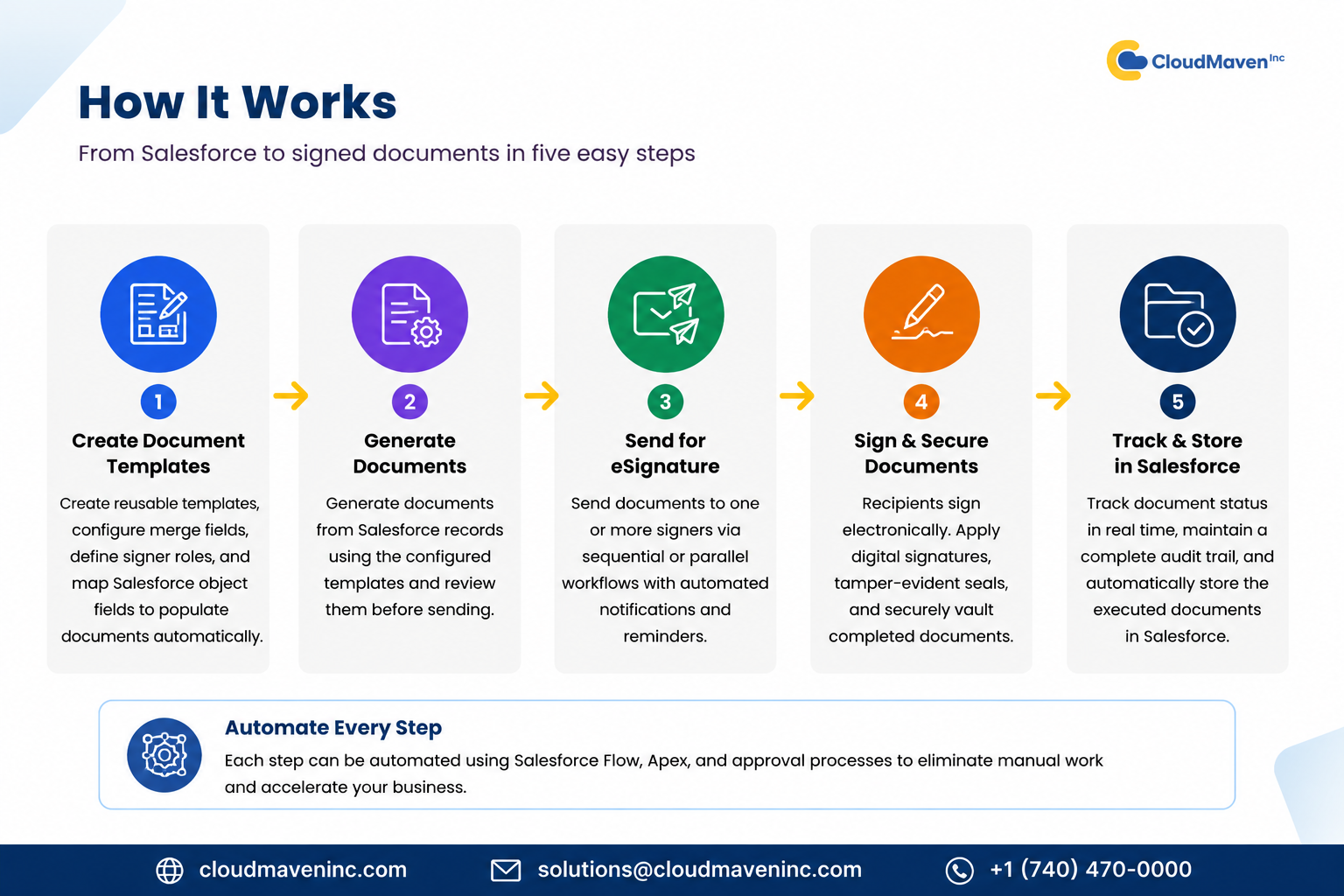
How It Works
-
Design — create reusable document templates, configure merge fields, define signer roles, and map Salesforce object fields to automatically populate documents with record data.
-
Generate — generate documents directly from Salesforce records using the configured templates and review them before sending.
-
Send — route documents for electronic signature using sequential or parallel signing workflows, with automated notifications and reminders.
-
Sign & Secure — recipients electronically sign the document, after which digital signatures, tamper-evident document sealing, and secure vaulting can be applied to protect the completed document.
-
Track & Store — monitor document status in real time, maintain a complete audit trail, and automatically store executed documents back in Salesforce for future reference.
Contact
Questions about Docgen & eSign ? Reach out to your Cloud Maven account team.