
|
Key |
Summary |
|---|---|
|
Release Date |
|
|
Release Version |
v3.39 |
|
Product Suite |
Bank Connect |
|
Focus Areas |
Google Gemini Integration |
|
Update Type |
Major feature release |
|
Next Scheduled Release |
January 2026 |
1. Release Overview
In this release, we have integrated Google Gemini API into the Document Insights application, enabling users to parse documents and interact directly with Google Gemini from Salesforce.
The primary objective of this enhancement is to provide an advanced, AI-powered parsing and conversational experience that supports complex structured documents, manual and automated parsing, and reusable prompt-based templates — all accessible within Salesforce without requiring external tools or data storage.
2. Key Highlights
2.1. Advanced Document Parsing with Google Gemini
Users can now parse complex forms, tabular documents, and unstructured documents using Google Gemini’s latest multimodal capabilities.
This integration allows parsing through:
-
Multi-section form layouts
-
Nested or multi-level table structures
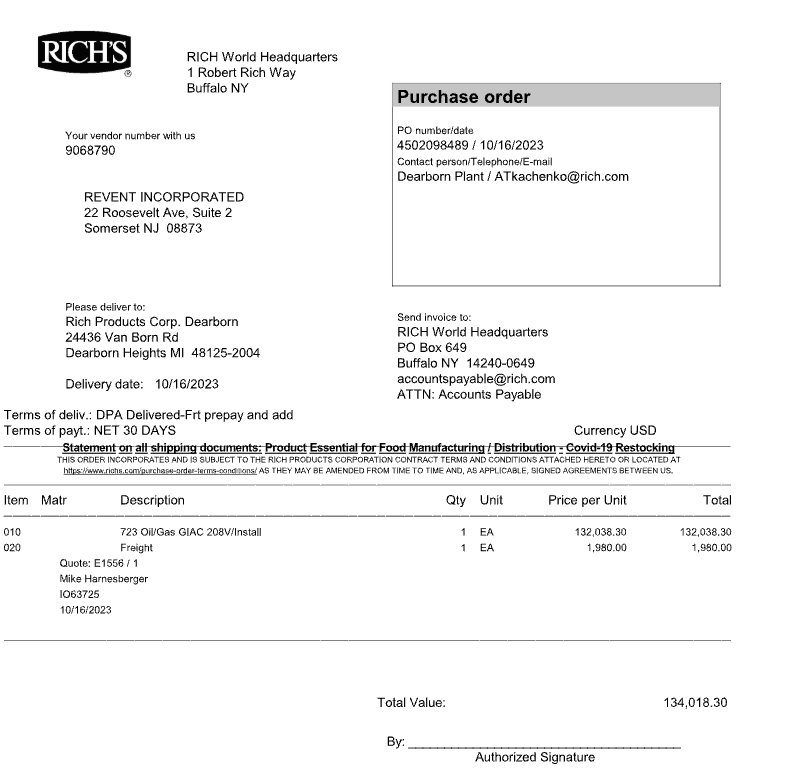
Both manual parsing and automated parsing workflows are supported, making the extraction process flexible and user-controlled.
2.2. Document Insights Table for parsed data
Once a document is parsed using Google Gemini, the extracted values are now displayed in a side-by-side layout within Document Insights. The left panel presents the source document, while the right panel displays the parsed data in a structured tabular format, making it easier for users to review, validate, and compare extracted fields with the original content.
This layout enhances visibility and reduces interpretation time by allowing users to:
-
Scroll through the document while simultaneously reviewing extracted fields
-
Validate data accuracy directly against the source content
-
Identify missing or incorrect values without switching views
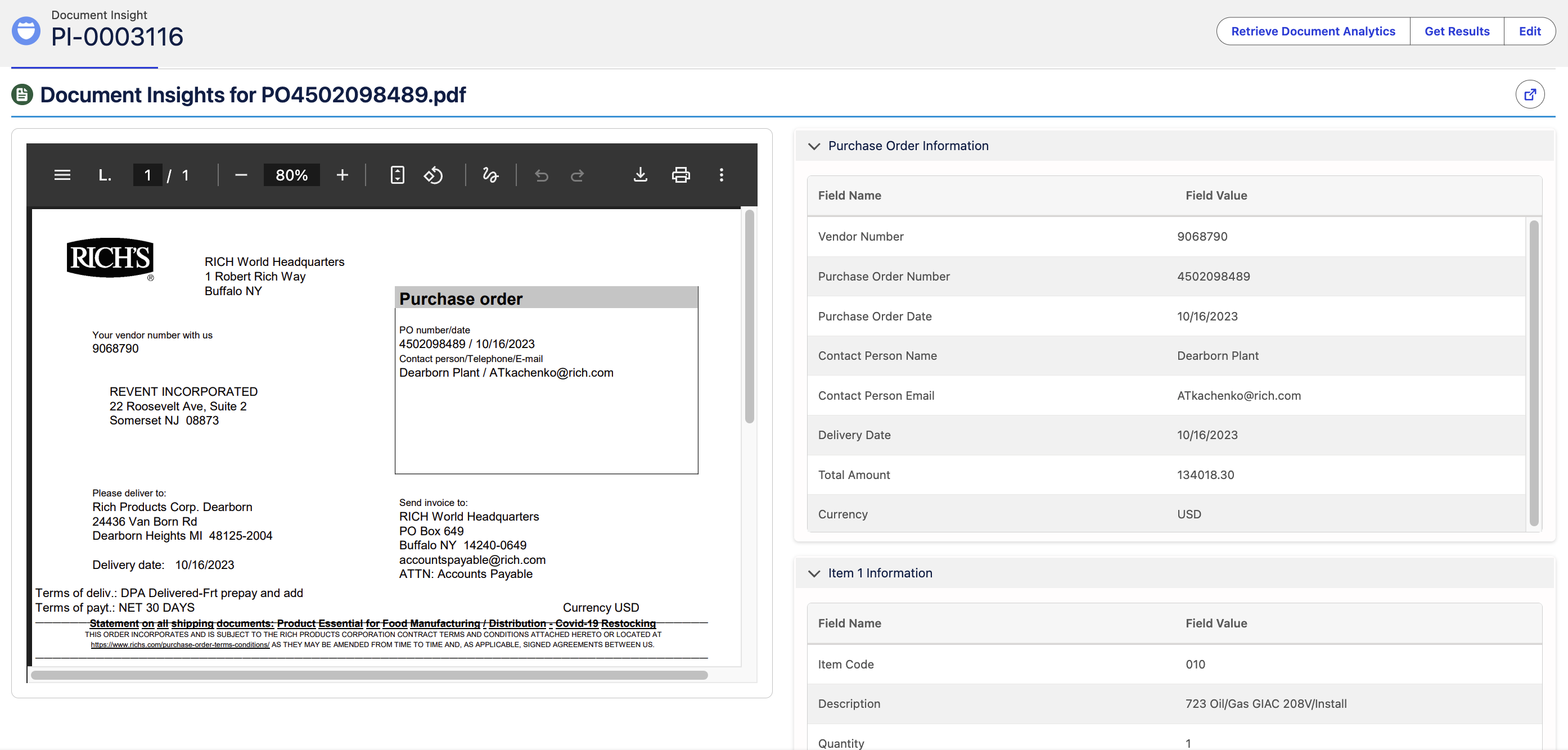
The structured display supports all parsing modes—manual, automated, and template-driven—ensuring a consistent review experience regardless of how the document was processed.
2.3. Conversational Interaction with Google Gemini
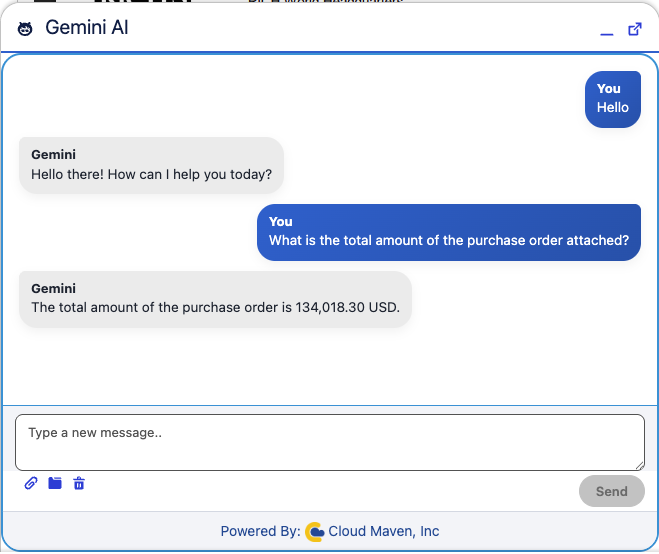
Users are now able to chat directly with Google Gemini from Salesforce, enabling quick retrieval of insights, clarifications, and extracted values without creating Salesforce records.
Key benefits:
-
Instant results without persisting data
-
Ability to validate or refine extracted values through conversation
-
Enhanced review process before committing values to records
2.4. Template-Based Prompt Storage & Reuse
The Document Template framework now supports Google Gemini end-to-end, allowing users to configure:
-
Custom prompts
-
Field extraction mappings
-
Child record mappings
-
Table and form extraction rules
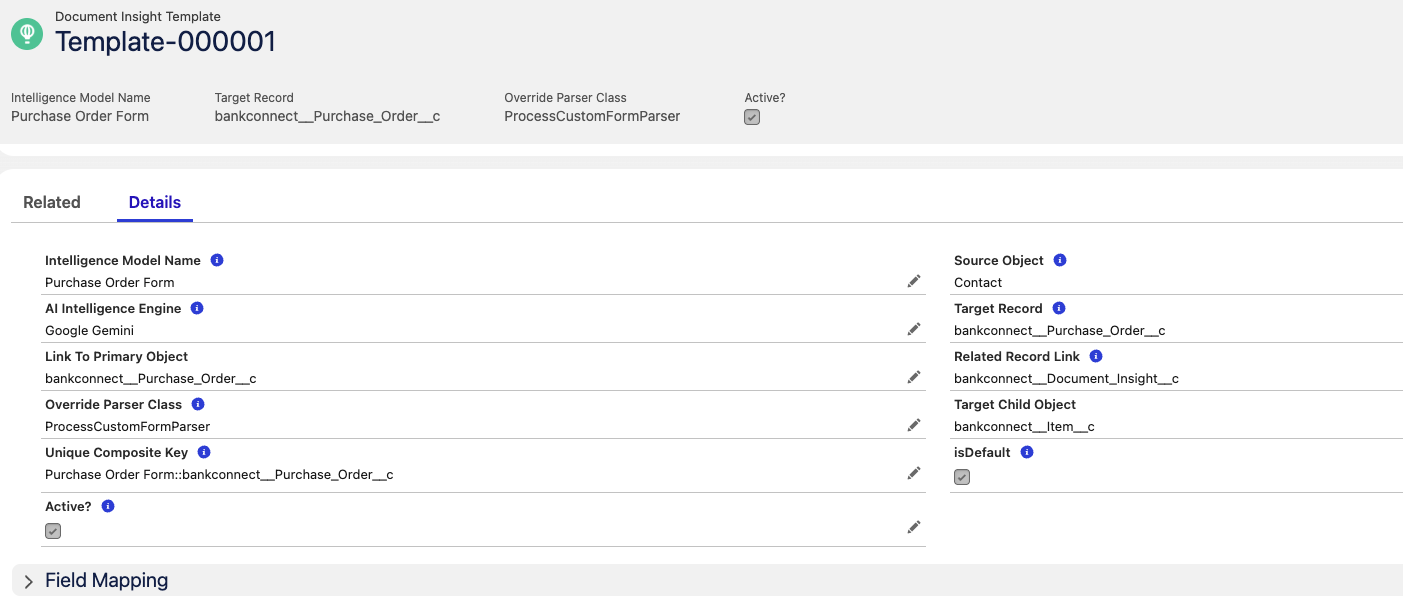
Reusable templates ensure users do not need to rewrite prompts each time. Once defined, prompts and mapping logic can be applied across documents to streamline parsing and consistency.
Example Prompt message
Analyze the attached document(s) and extract all required Purchase Order data points into the final JSON structure provided below. Follow the specific parsing rules listed in the Extraction Logic sections precisely.

Target JSON Schema
The final response MUST be formatted only as the JSON object below. Maintain the exact field names, nesting structure, and array format for line items (tableData).

JSON

{
    "VendorNumber": "",
    "PurchaseOrderNumber": "",
    "PurchaseOrderDate": "",
    "ContactPersonName": "",
    "ContactPersonEmail": "",
    "ContactPersonPhone": "",
    "DeliveryDate": "",
    "TotalAmount": "",
    "Currency": "",
    "tableData": [
        {
            "ItemCode": "",
            "ItemDescription": "",
            "Quantity": "",
            "Unit": "",
            "UnitPrice": "",
            "TotalPrice": ""
        }
    ]
}
⚙️ General Extraction Instructions (Strict Rules)
Date Format: Date returned in the response should always be in format "MM/DD/YYYY".

Numeric Formatting (NEW RULE): Return all numeric values (Quantity, UnitPrice, TotalAmount, TotalPrice, etc.) without commas (e.g., "134018.30" instead of "134,018.30").

Checkboxes/Radio Buttons/Other Boxes: Return "true" if checked/selected, and "false" if unchecked/not selected.

Non-Text Values (e.g., Numbers, Dates, Codes, Amounts): Return the value in the JSON in text format (as a string).

Multiple Values for a Single Field: If the document provides multiple acceptable values for a single field in the target JSON schema, only give the first value found.

Extraction Logic (Field-Specific Rules)
VendorNumber: Extract the vendor's unique identification number as listed on the PO.

PurchaseOrderNumber: Extract the primary identifier for the document, often labeled as "PO Number" or "Order No."

PurchaseOrderDate: Extract the date the purchase order was issued.

ContactPersonName, ContactPersonEmail, ContactPersonPhone: Extract the name, email, and phone number for the primary buyer or contact person/department listed for the order. If a name is part of an organizational unit (e.g., "Dearborn Plant / ATkachenko"), prioritize the organizational unit as the name.

DeliveryDate: Extract the specified date for the required delivery.

TotalAmount: Extract the final, grand total value of the purchase order.

Currency: Extract the currency type used for the transaction (e.g., USD, EUR).

tableData (Line Items): Extract all detailed line item information from the main products/services table:

ItemCode: The unique code for the product or service.

ItemDescription: The detailed description of the product or service.

Quantity: The number of units ordered.

Unit: The unit of measure (e.g., EA, LB, CS).

UnitPrice: The cost per unit.

TotalPrice: The total cost for that specific line item.
2.5. Automated Parsing & Background Processing
The integration supports automated parsing triggered after document upload or based on business workflows.
Examples include:
-
Parse when document status changes
-
Parse on scheduled processing
This eliminates manual steps and ensures timely data extraction for downstream processes.
3. Technical Summary
|
Feature |
Description |
|---|---|
|
Integration Provider |
Google Gemini API |
|
Supported Data Types |
Forms, Tables, Complex Documents |
|
Interaction Modes |
Chat-based interaction, Automated Parsing, Manual Parsing |
|
Template Support |
Prompt Storage, Field Mapping, Child Record Mapping |
|
Output Handling |
On-demand results without storage, or structured record population |
|
Dependencies |
Document Insight Templates, Google Gemini API, Document Management System |
4. Benefits
-
Powerful Parsing Capabilities – Extract values from complex tables and forms beyond standard OCR limitations.
-
Reusable Prompt Framework – Reduce repetitive effort with template-based parsing and automated field mapping.
-
Instant Conversational Insights – Validate, refine, and retrieve results through real-time chat without storing data.
-
Unified Salesforce Experience – Seamless interaction from Document Insight pages without needing external tools.
-
Automation Ready – Enable automatic parsing workflows based on business rules and document lifecycle events.