
Document Insights

Ocrolus Release Notes v3.37


Key

Summary

Release Date

Release Version

v3.37

Product Suite

Bank Connect

Focus Areas

Document Insight visualization, metadata-driven configuration

Update Type

Major feature release

Next Scheduled Release

October 2025


1. Release Overview

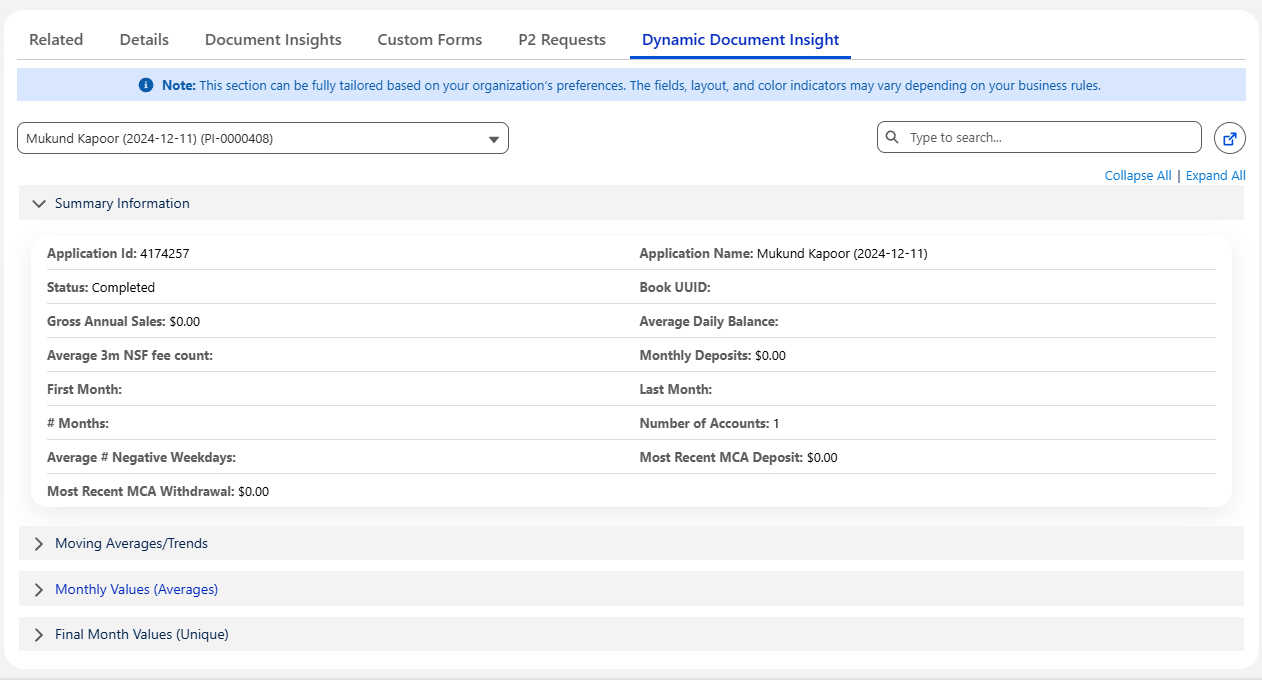
In this release, we have introduced a new Lightning Web Component (LWC) designed to dynamically render and configure Document Insight data using a JSON configuration defined in Custom Metadata.

The goal of this enhancement is to simplify the presentation and management of a large number of fields within Document Insight records by enabling a configurable, section-based, and interactive UI.

2. Key Highlights

2.1. Dynamic and Configurable UI

  • The component reads a JSON configuration from custom metadata that defines which fields to display and how they should be grouped into logical sections.

  • This allows for flexible customization without code changes — simply update the JSON metadata to control field visibility, order, and grouping.
5.png

2.2. Support for Multiple Record Contexts

  • The component can be placed on both:

    • Document Insight record page

    • Parent record page (e.g., Account, Opportunity, or Contact)

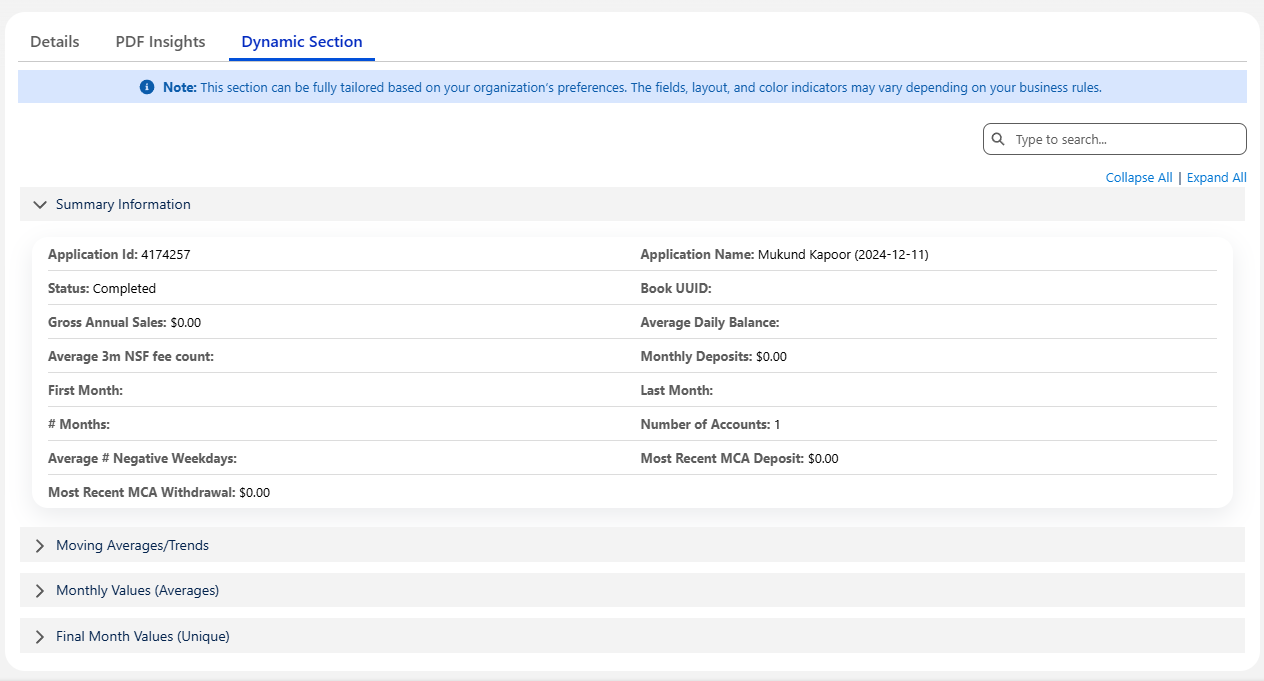
From Document Insight record:

  • When the record has a Completed status, the component displays all configured fields with appropriate formatting (e.g., Currency, Percentage, Date, Number).

  • Field values automatically adapt display formatting based on field data type.
1.png

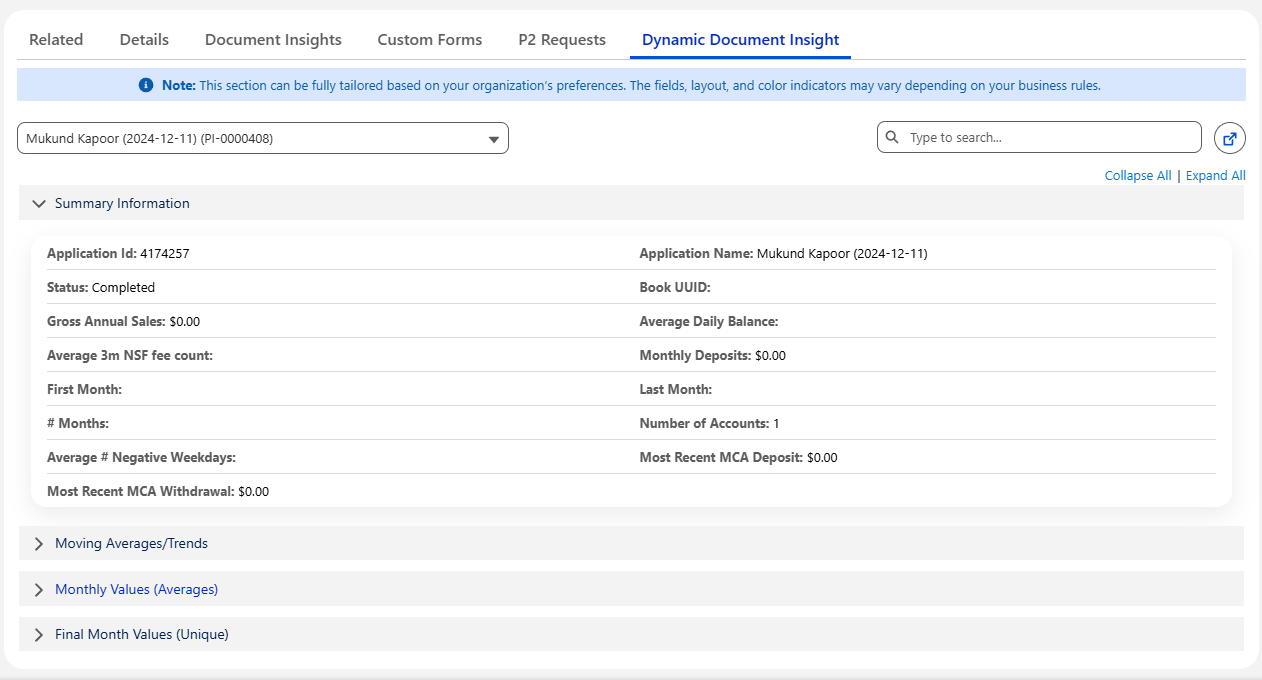
From Parent record:

  • The component retrieves all related Document Insight records whose source is Ocrolus.

  • A dropdown allows users to select from available Document Insights, and the component dynamically updates to display the fields and values for the selected record.
2.png

2.3. Range-Based Color Indicators

  • A new range filter feature allows fields to be highlighted in different colors based on configured value thresholds.

  • Example configuration:

    • Show field value in green if greater than $10,000

    • Show field value in red if less than $5,000

  • These rules are fully configurable in the JSON metadata and help users quickly identify data insights or anomalies.

3.png

2.4. Searchable Field Interface

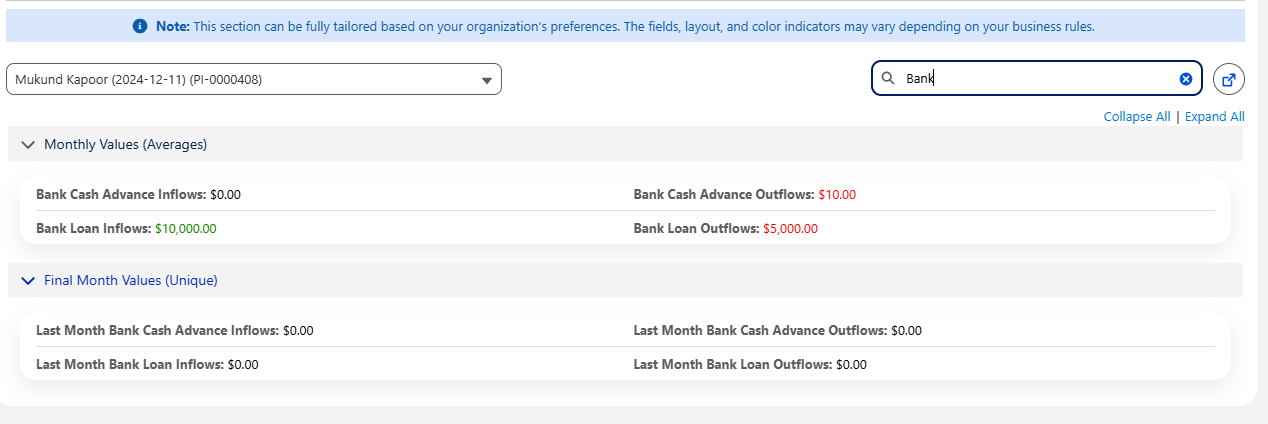
  • Due to the large number of fields in Document Insight records, the component includes a field search bar.

  • Users can easily search and filter visible fields by name or label, improving navigation and usability.
4.png

3. Technical Summary

Feature

Description

Component Name

DynamicSectionBuilder(LWC)

Configuration Source

Custom Metadata JSON

Supported Contexts

Document Insight Record Page, Parent Record Page

Features

Field Grouping, Dynamic Rendering, Value Formatting, Range-based Highlighting, Search Filter

Dependencies

Document Insight Object, Ocrolus Source, Custom Metadata Configuration


4. JSON Configuration Structure Explanation

Click here to learn more about the JSON

Key

Type

Description

Example / Notes

sectionInfo

Array

Defines the sections and layout of the displayed fields. Each section can have its own name, field list, column layout, and collapse behavior.

[ { "sectionName": "Financial Summary", ... } ]

sectionInfo.sectionName

String

The label displayed for the section.

"Test Section 1"

sectionInfo.order

String / Number

Determines the order in which sections appear. Lower numbers appear first.

"1"

sectionInfo.fields

Array

List of API field names from the Document Insight object to display in this section.

[ "bankconnect__ATM_Inflows__c", "bankconnect__ATM_Outflows__c" ]

sectionInfo.columns

String / Number

Defines how many columns of fields to display per row.

"2"

sectionInfo.isCollapsed

String / Boolean

Indicates if the section should be collapsed initially.

"true" or "false"

rangeFilter

Array

Specifies conditional color formatting rules for field values based on numerical ranges.

[ { "field": "bankconnect__ATM_Outflows__c", ... } ]

rangeFilter.field

String

The API name of the field to apply conditional formatting.

"bankconnect__ATM_Outflows__c"

rangeFilter.lowerLimit

String / Number

Minimum threshold value.

"5000"

rangeFilter.higherLimit

String / Number

Maximum threshold value.

"10000"

rangeFilter.lowColor

String

Color code applied when value ≤ lower limit.

"#1e8701"

rangeFilter.highColor

String

Color code applied when value ≥ higher limit.

"#f50000"

rangeFilter.defaultColor

String

Default text color when value is between limits.

"#000000"

setupInformation

Object

Contains additional configuration notes or documentation metadata.

{ "note": "Can be tailored per org" }

setupInformation.note

String

Descriptive note to guide admins configuring the component.

"This section can be tailored..."

Sample JSON Configration
{
  "sectionInfo": [
    {
      "sectionName": "Test Section 1",
      "order": "1",
      "fields": [
        "bankconnect__Application_Name__c",
        "bankconnect__Application_Id__c",
        "bankconnect__ATM_Inflows__c",
        "bankconnect__ATM_Outflows__c",
        "bankconnect__Average_Federal_Taxes__c",
        "bankconnect__Annual_MCA_Withhold_Percent__c",
        "bankconnect__ATM_Inflows__c",
        "bankconnect__ATM_Outflows__c",
        "bankconnect__Average_Federal_Taxes__c",
        "bankconnect__Annual_MCA_Withhold_Percent__c",
        "bankconnect__Annual_MCA_Withhold_Percent__c",
        "bankconnect__ATM_Inflows__c",
        "bankconnect__ATM_Outflows__c",
        "bankconnect__Average_Federal_Taxes__c",
        "bankconnect__Annual_MCA_Withhold_Percent__c"
      ],
      "columns": "2",
      "isCollapsed": "false"
    },
    {
      "sectionName": "Test Section 2",
      "order": "2",
      "fields": [
        "bankconnect__Average_Fintech_MCA_Deposits__c",
        "bankconnect__Average_Fintech_MCA_Outflows__c",
        "bankconnect__Average_Internal_Transfer_Inflows__c",
        "bankconnect__Average_Internal_Transfer_Outflows__c",
        "bankconnect__Annual_MCA_Withhold_Percent__c",
        "bankconnect__Average_Fintech_MCA_Outflows__c",
        "bankconnect__Average_Internal_Transfer_Inflows__c",
        "bankconnect__Average_Internal_Transfer_Outflows__c",
        "bankconnect__Annual_MCA_Withhold_Percent__c",
        "bankconnect__Average_Fintech_MCA_Outflows__c",
        "bankconnect__Average_Internal_Transfer_Inflows__c",
        "bankconnect__Average_Internal_Transfer_Outflows__c",
        "bankconnect__Annual_MCA_Withhold_Percent__c"
      ],
      "columns": "3",
      "isCollapsed": "true"
    }
  ],
  "rangeFilter": [
    {
      "field": "bankconnect__ATM_Inflows__c",
      "lowerLimit": "5",
      "higherLimit": "10"
    },
    {
      "field": "bankconnect__ATM_Outflows__c",
      "lowerLimit": "5",
      "higherLimit": "10",
      "lowColor": "#1e8701",
      "highColor": "#f50000",
      "defaultColor": "#000000"
    },
    {
      "field": "bankconnect__Average_Federal_Taxes__c",
      "lowerLimit": "5",
      "higherLimit": "10"
    },
    {
      "field": "bankconnect__Average_Fintech_MCA_Deposits__c",
      "lowerLimit": "0",
      "higherLimit": "100"
    },
    {
      "field": "bankconnect__Average_Fintech_MCA_Outflows__c",
      "lowerLimit": "100",
      "higherLimit": "1000"
    },
    {
      "field": "bankconnect__Average_Internal_Transfer_Inflows__c",
      "lowerLimit": "100",
      "higherLimit": "1000",
      "lowColor": "#1e8701",
      "highColor": "#f50000",
      "defaultColor": "#000000"
    },
    {
      "field": "bankconnect__Average_Internal_Transfer_Outflows__c",
      "lowerLimit": "0",
      "higherLimit": "100",
      "lowColor": "#1e8701",
      "highColor": "#00f500",
      "defaultColor": "#000000"
    }
  ],
  "setupInformation": {
    "note": "This section can be fully tailored based on your organization’s preferences. The fields, layout, and color indicators may vary depending on your business rules."
  }
}

5. Benefits

  • Dynamic Configuration – No code changes required to adjust field presentation.

  • Improved Readability – Fields are grouped into meaningful sections with type-based formatting.

  • Visual Data Insights – Conditional coloring highlights important values and thresholds.

  • Enhanced Usability – Search functionality simplifies working with large field sets.

  • Cross-Record Access – Easily view and compare Document Insights from both record and parent contexts.