
This document explains the data model behind Cloud Maven's Secure Email application — the objects, fields, and relationships in the system, centered on the Secure EmailMessage object and its child object, Email Recipient.
1. Object Relationship Summary
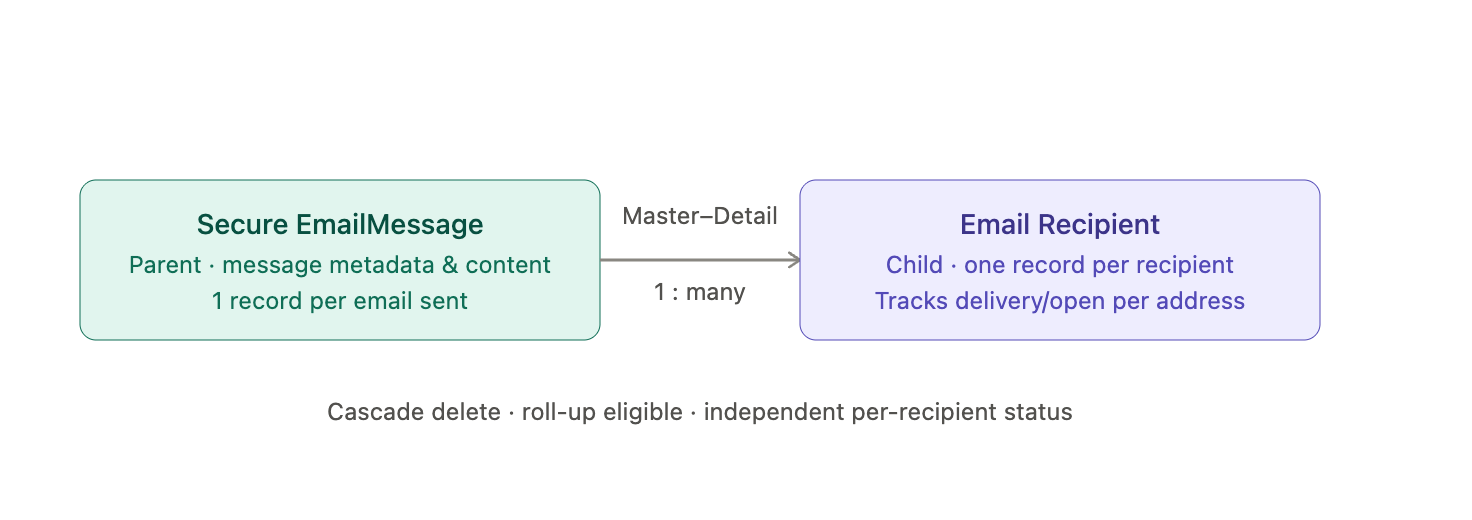
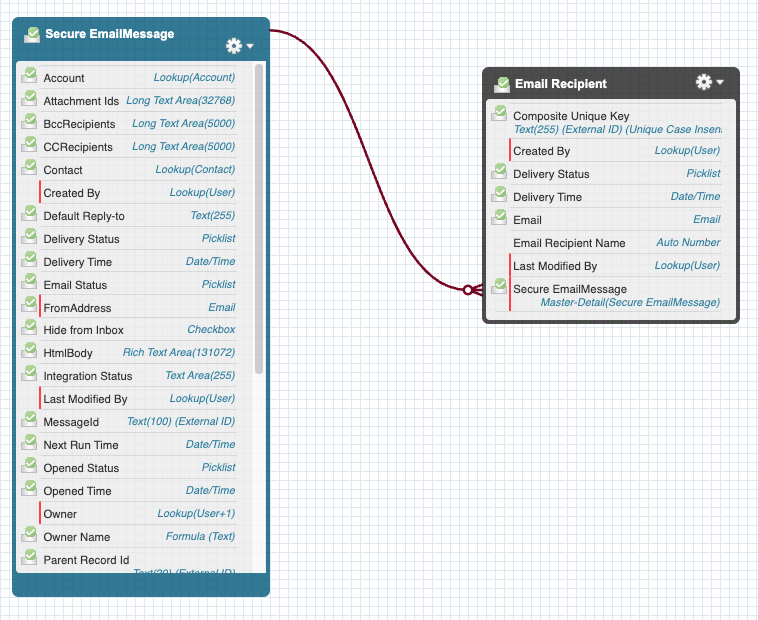
The Secure Email data model consists of two objects in a parent-child relationship:
|
Object |
Role |
Purpose |
|---|---|---|
|
Secure EmailMessage |
Parent |
Stores metadata and content of each secure email sent or received via Paubox |
|
Email Recipient |
Child |
Stores each recipient of a secure email as a separate record |
Relationship type: Master-Detail (Secure EmailMessage is the master). This allows each recipient's delivery and open status to be tracked independently, supports cascade delete, and makes the child records eligible for roll-up summaries.
2. Secure EmailMessage Object
Represents a single outbound or inbound secure email.
Relationship & Ownership Fields
|
Field |
Type |
Description |
|---|---|---|
|
Account |
Lookup(Account) |
Related account (optional) |
|
Contact |
Lookup(Contact) |
Primary contact, populated when the email is triggered from a Contact |
|
Parent Record Id |
Text(20), External ID |
The originating record (Case, Opportunity, custom object) |
|
Parent Record Name |
Formula |
Friendly display name for the parent record |
|
Owner |
Lookup(User) |
Message owner |
|
Owner Name |
Formula |
Owner display name |
Email Routing Fields
|
Field |
Type |
Description |
|---|---|---|
|
Recipients |
Long Text Area |
Comma-separated list of TO recipients |
|
CC Recipients |
Long Text Area |
CC recipients |
|
BCC Recipients |
Long Text Area |
BCC recipients |
|
Email Status |
Picklist |
Created, Success, Failed |
|
Delivery Status |
Picklist |
Delivered, Bounced, Processing |
|
Reply-To |
|
Reply handler address |
|
From Address |
|
Sender email address |
Content Fields
|
Field |
Type |
Description |
|---|---|---|
|
HTML Body |
Rich Text Area |
Full email HTML content |
|
Text Body |
Long Text Area |
Optional plain-text version |
|
Attachment Ids |
Long Text Area |
Comma-separated ContentVersion IDs |
Processing Fields
|
Field |
Type |
Description |
|---|---|---|
|
Process via Batch |
Checkbox |
Marks messages for batch processing |
|
Schedule Time |
Date/Time |
For scheduled or delayed sends |
|
Next Run Time |
Date/Time |
Used by the scheduling engine |
|
MessageId |
Text(100), External ID |
Paubox message tracking ID |
|
Source TrackingId |
Text(100), External ID |
Used for analytics or automation |
|
Record Type |
Picklist |
Outbound or Inbound classification |
Delivery Tracking Fields
|
Field |
Type |
Description |
|---|---|---|
|
Delivery Time |
Date/Time |
When the email was delivered |
|
Opened Status |
Picklist |
Opened, Not Opened |
|
Opened Time |
Date/Time |
Timestamp of the open event |
|
Integration Status |
Text |
API call notes and error details |
Metrics Fields
|
Field |
Type |
Description |
|---|---|---|
|
Total Number of Recipients |
Number |
Count of TO recipients |
|
Template Name |
Text |
Template used during send, if applicable |
3. Email Recipient Object
Each Email Recipient record represents one target recipient from a Secure EmailMessage's distribution list. The Master-Detail relationship to Secure EmailMessage provides cascade delete, roll-up summary eligibility, and independent per-recipient tracking.
|
Field |
Type |
Description |
|---|---|---|
|
|
|
The recipient's email address |
|
Delivery Status |
Picklist |
Delivered, Bounced, Deferred |
|
Delivery Time |
Date/Time |
Timestamp of recipient-specific delivery |
|
Email Recipient Name |
Auto Number |
Unique identifier for UI display |
|
Composite Unique Key |
Text(255), External ID |
Ensures deduplication |
|
Created By / Last Modified By |
Standard |
Audit fields |
4. Data Flow Summary
-
Secure EmailMessage created — manually, via Flow, Apex, or Batch; contains all message-level metadata.
-
Email Recipient records generated — one child record per email address across TO, CC, and BCC.
-
Paubox sends the email — the MessageId is stored at the parent level; delivery updates reflect at both parent and child level.
-
Status updates flow back — overall status on the parent, per-recipient status on each child.
5. Why This Structure
The parent-child model enables:
-
Multi-recipient tracking with independent statuses
-
Per-recipient delivery analytics
-
Threading and messageId-based tracking
-
Scalable bulk-send operations
-
Child-level reporting and roll-ups
-
Clean, predictable UI representation
Related Pages
-
Secure Email – Architecture & Workflow — how messages move through this data model end-to-end
-
Features — capability reference
-
Configuration Settings — settings that affect how these fields populate