
Overview
To ensure a smooth onboarding experience, this questionnaire helps us gather important information about your organization’s Salesforce environment, compliance goals, integration scope, and readiness for the CLEAR API integration. Please complete the form before your scheduled onboarding session.
General Client Information
Organization & Contact Information
|
Field |
Response |
|---|---|
|
Organization Name |
|
|
Primary Contact Name |
|
|
Title / Role |
|
|
Email Address |
|
|
Phone Number |
|
|
Salesforce Admin Contact (if different) |
|
Salesforce Environment
|
Question |
Response |
|---|---|
|
Do you use Salesforce Production or Sandbox for testing? |
|
|
Salesforce Org ID (optional for sandbox setup) |
|
|
Are there any special considerations we should be aware of while developing or deploying the integration (e.g., data residency, approval workflows, restricted environments)? |
|
|
Do you follow any internal release process we should align with (e.g., change windows, release cycles, pre-deployment approvals)? |
|
Integration & Use Case Goals
|
Question |
Response |
|---|---|
|
What are your primary goals for using the CLEAR integration? (e.g., KYC, AML, screening) |
|
|
Which Salesforce objects will be used? (Leads, Accounts, Contacts, Cases, etc.) |
|
|
Will you use Confirm ID, Risk Inform, Person or Business Search, Person or Business Reports, Adverse Media, Batch Alerts, or all features? |
|
|
Are you interested in manual use, automated workflows, or both? |
|
|
Do you need case management features enabled? |
|
|
Are there specific departments or user groups involved? |
|
Trial Logistics & Timeline
|
Question |
Response |
|---|---|
|
Preferred trial start date |
15 days |
|
Expected trial duration |
15 days |
|
Any internal deadlines or initiatives this trial aligns with? |
|
|
Preferred meeting times for kickoff and training |
|
API Credentials Requirement
Once the client is onboarded with Thomson Reuters, the TR integration team will securely share the client's API credentials with the Cloud Maven team via encrypted email.
Client or TR team should provide us with the following credentials -
-
Credentails(Username and Password)
-
SSL Certificate file
-
SSL Password
-
ID Confirm Definition
-
Risk Inform Definition
Implementation and Workflow Questions
Source Object for Search
-
Question: What is the API Name of the Salesforce object where the Adverse Media, ID Confirm, Person or Business Search and Risk Inform features should be triggered (e.g., Contact, Account, or a custom object)?
-
Purpose: Links the search and monitoring capabilities to the appropriate Salesforce object.
Entity Type
-
Question: Should the search support Person, Business, or both?
-
Purpose: Determines applicable search fields for each feature (e.g., name and DOB for individuals, or company name).
Search Type Preference
-
Question: Which CLEAR workflow(s) would you like to implement?
1. ID Confirm + Risk Inform
2. Person Search + Risk Inform
3. Business Search + Risk Inform
4. Person Search + Person Report
5. Business Search + Business Report
6. Adverse Media Search
7. Adverse Media Monitoring List
8. Court Search
9. Multiple Workflow (please specify) -
Purpose: Defines the expected scope of identity verification, due diligence, and risk screening.
Note: The CLEAR integration supports multiple workflow combinations based on your business requirements. For identity verification workflows, clients can choose to:
-
ID Confirm + Risk Inform – Verify an individual or business identity first, then automatically generate a Risk Inform report.
-
Person/Business Search + Risk Inform – Perform a Person or Business Search and generate a Risk Inform report for the selected result.
-
Person/Business Search + Person/Business Report – Perform a Person or Business Search and generate an Enhanced Due Diligence (EDD) Report for the selected result.
Manual vs. Automated Execution
-
Question: Should each feature be triggered manually via button, automatically through Flow/Apex, or both?
-
Purpose: Clarifies how each service should be initiated.
Automation Trigger Criteria
-
Question: If automated, what field or record criteria should initiate the checks (e.g., status change, record creation)?
-
Purpose: Defines when background checks run in your process.
Page Layout Placement
-
Question: On which page layouts should the action buttons for each feature (Adverse Media, ID Confirm, Risk Inform) be placed?
-
Purpose: Ensures user access directly within relevant Salesforce records.

User Access Control
-
Question: Which users or profiles should be allowed to access these features?
-
Purpose: Ensures only authorized personnel can initiate or view results for sensitive checks.
Additional Questions (Adverse Media)
Additional Questions related to the Adverse Media
Default Date Range for Search
-
Question: What default date range should be used for media coverage (e.g., Past 6 Months, 1 Year)?
-
Purpose: Sets how far back the system fetches articles, impacting both data volume and relevance.
Note: This range will auto-populate in the manual search interface and be used by default in any automation.
5. Continuous Monitoring – Adverse Media & Sanctions
The Monitoring feature enables automatic tracking of individuals or organizations for negative media, sanctions, and coverage using Thomson Reuters' global data sources. Once a record is added to a Monitor List, the system continuously checks for new adverse media mentions and updates the results within Salesforce, eliminating the need for manual effort.
This functionality supports proactive risk management, enhances regulatory compliance, and ensures timely visibility into reputational threats.
Additional Questions related to the Continuous Monitoring
Add to Monitoring List (Record-Level Access)
-
Question: Should users be able to add individual records to a Monitor List directly from the record page?
-
Purpose: Enables front-line teams to initiate real-time monitoring of high-risk contacts or accounts as needed.
Monitoring Source Object
-
Question: What is the API Name of the Salesforce object that should support monitoring (e.g., Contact, Account)?
-
Purpose: Defines which object(s) can be included in the background monitoring process.
Note: A button will be placed on this object to add records to an existing Monitor List.
Page Layout Placement for Monitoring
-
Question: On which page layout(s) should the “Add to Monitoring List” button appear?
-
Purpose: Ensures users can easily initiate monitoring from relevant record views.
List View Enhancement
-
Question: Would you like to enable an “Add Monitor List Members” button on the List View for the source object?
-
Purpose: Allows users to add multiple records to a Monitor List in bulk—either to an existing list or by creating a new one with selected members.
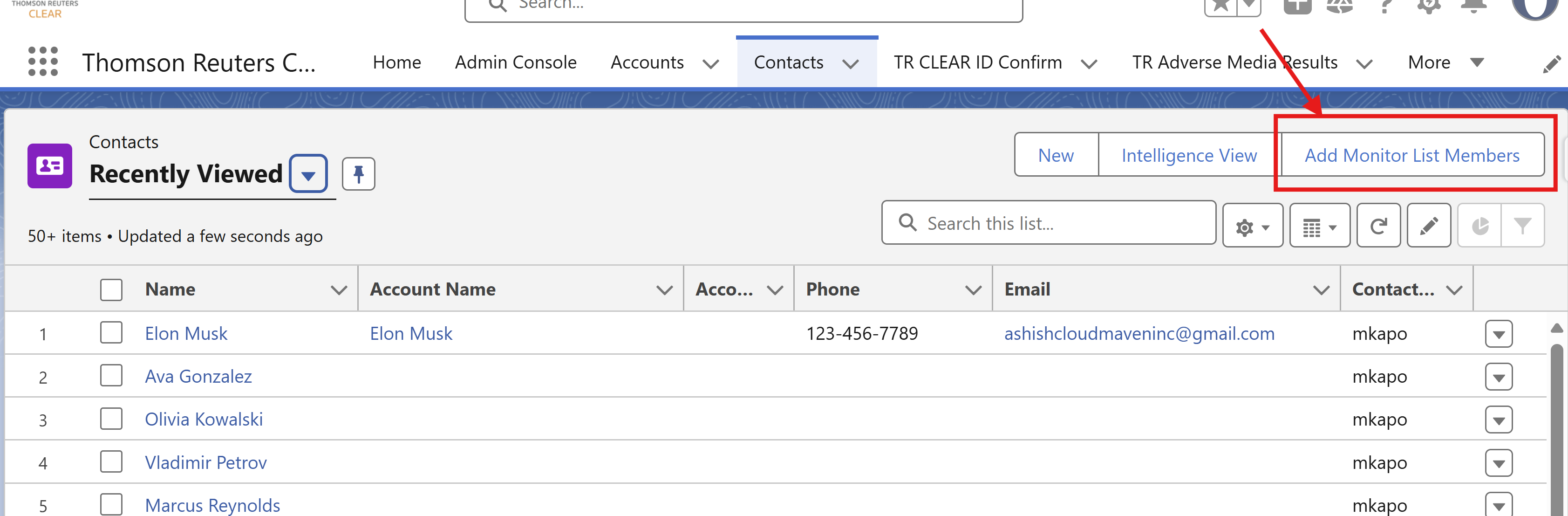
Note: This enables efficient mass management of monitored subjects directly from Salesforce list views.
User Access for Monitoring
-
Question: Which users or profiles should have access to the Adverse Media Monitoring feature?
-
Purpose: Controls visibility and access to sensitive monitoring configurations and results.
Monitoring Batch Frequency
-
Question: How frequently should the system check for updates on monitored records (e.g., every 6 hours, daily)?
-
Purpose: Defines how quickly new risk findings are surfaced in Salesforce from Monitor Lists.
Note: This background job runs on a schedule to fetch and display updated adverse media results. Please specify the desired frequency.
6. Field Mapping
Parameters marked in red are mandatory.
|
Type |
API Input Parameters |
Supported Endpoints? |
Default Mapping |
Override
|
|---|---|---|---|---|
|
Person |
First Name |
Required for Confirm ID, Risk Inform, Adverse Media |
Contact.FirstName |
FirstName (API Name) |
|
Last Name |
Required for Confirm ID, Risk Inform, Adverse Media |
Contact.LastName |
LastName (API Name) |
|
|
SSN |
Required for Confirm ID, Risk Inform |
Contact.criminalreports__Social_Security_Number__c |
SSN(API Name) |
|
|
|
Not Required |
Contact.Email |
Email (API Name) |
|
|
Phone |
Not Required |
Contact.Phone |
Phone (API Name) |
|
|
DOB |
Required for Confirm ID, Risk Inform |
Contact.BirthDate |
DOB (API Name) |
|
|
Address |
Required for Confirm ID, Risk Inform |
Contact.MailingAddress |
Address (API Name) |
|
|
Business / Entity |
Business Name |
Required for Confirm ID, Risk Inform, Adverse Media |
Account.Name |
Business Name (API Name) |
|
Tax Id |
Required for Confirm ID, Risk Inform |
Account.criminalreports__Business_Tax_Id__c |
TaxId (API Name) |
|
|
|
Address |
Required for Confirm ID, Risk Inform |
Account.BillingAddress |
Address (API Name) |
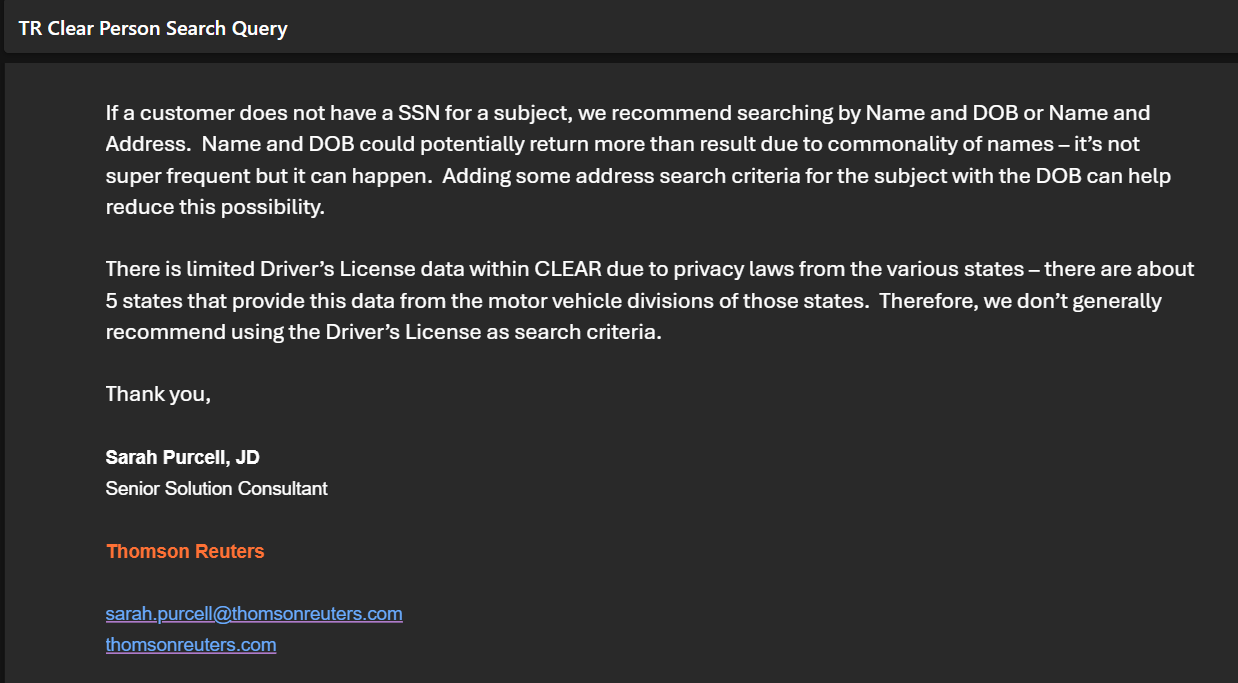
For CLEAR Person Search, in cases where SSN is not available, it is recommended to use alternative identifiers such as Name + DOB or Name + Address for searches. Please refer to the screenshot/example below for guidance on proceeding without an SSN.
-
Please ensure that all specified fields exist on the source object(s) and are accessible to the integration user's profile.
-
Field mappings will be configured using Custom Metadata under the CLEAR Mapping configuration.
-
If multiple objects are involved, separate mapping details must be provided for each object individually.
7. Advanced Case Management
Cloud Maven provides a robust and flexible case management framework that can be tailored to align with your internal processes and compliance policies. Whether you're managing sanctions alerts, adverse media findings, or investigative workflows, our system can be configured to meet your operational and regulatory needs.
|
Configuration Item |
Client Response |
|---|---|
|
Can you describe your current process for identifying, reviewing, and responding to sanctions-related alerts or matches? |
|
|
Case Creation Triggers |
|
|
Case Record Type / Category |
|
|
Case Assignment Rules |
|
|
Escalation Logic & Timeframes |
|
|
Case Status Values |
|
|
Notification Preferences |
|
|
Fields to Populate on the Case |
|
|
Case Access Control (Users/Roles) |
|
|
Reporting & Audit Requirements |
|
This feature is not included in the proof of concept (POC) or free trial. A subscription to the Advanced Case Management package is required to access and test this functionality.