
When a recipient uploads files but does not provide all requested file tags, Secure File Transfer can:
-
Show which tags are still missing (UI message), and/or
-
Automatically create a follow-up request for only the missing tags
|
Feature area |
Object |
Auto follow-up creates |
|---|---|---|
|
P1 — Secure File / Media Request |
|
New File Request (Pull / Request File) |
|
P2 — Secure P2 Container |
|
New P2 Pull feature on the same container |
Both use the master switch SFT_TriggerFRForMissingTags = true.
How P1 Works
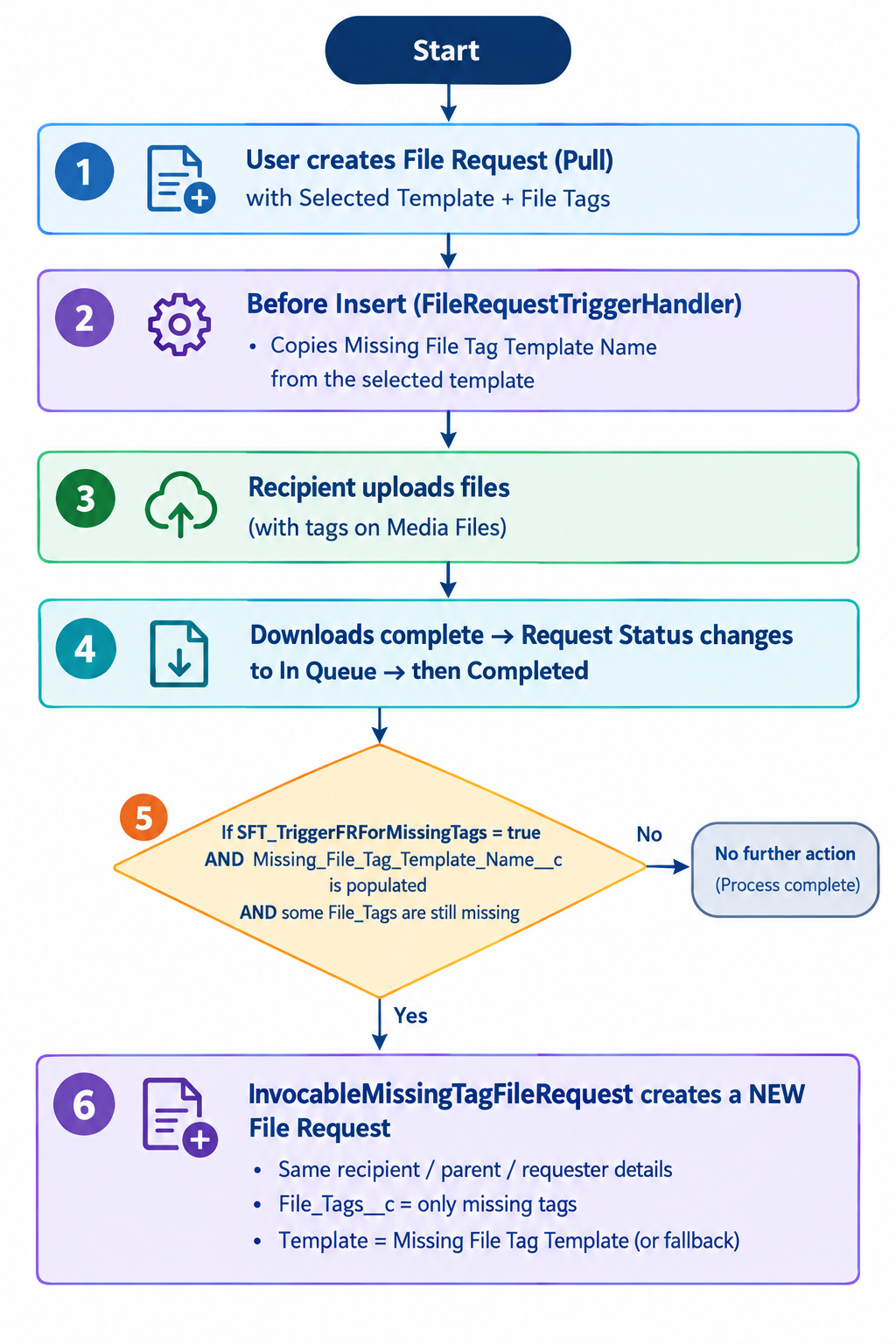
Steps for setting the Missing File tags for P1 Requests
1. Enable the feature
Custom Setting: DataTransfer_Settings__c
|
Name |
Value |
|---|---|
|
|
|
Without this, completion still happens, but no auto follow-up File Request is created.
(UI missing-tag message can still work independently.)
2. Create follow-up Text/Email Template
Create a Text/Email Template used only for missing-tag follow-ups, e.g. Missing Tags Follow-up.
Configure:
-
Email Subject / Email Message
-
SMS Message / Portal (Link) Message
-
Optional: File Tags (usually overridden by remaining missing tags)
-
Request Type: Media Request / Pull
3. Link it on the primary request template
On the main Text/Email Template used when creating the File Request:
|
Field |
Purpose |
|---|---|
|
|
Available tags (semicolon-separated), e.g. |
|
|
Lookup to the follow-up Text/Email Template |
On File Request insert, the system stores:
File_Request__c.Missing_File_Tag_Template_Name__c = follow-up template Name
4. Optional P1 settings
|
Setting |
Object |
Purpose |
|---|---|---|
|
|
|
Fallback template name if Missing File Tag Template is blank |
|
|
|
|
|
|
|
|
|
|
|
Defaults applied when creating the follow-up File Request |
|
|
|
Comma-separated File Requests field API names to copy old → new |
5. Ensure media files carry tags
Uploaded/downloaded Media_File__c records must have Tags__c matching requested tag values (case-insensitive). Untagged or mistagged files count as missing.
How to Test functionality