This document outlines the step-by-step process to add a Cloud Maven representative as a team member on your Plaid account. This enables Cloud Maven to assist with support and manage API access as needed.
Steps to Add a Cloud Maven Representative
-
Login into the Plaid Dashboard with your unique credentials provided by Plaid
-
Navigate to Team Settings --> Members
-
Click on Add a Team Member.
-
Enter the following details for the Cloud Maven representative:
-
FirstName: {Rep First Name},
-
LastName: {Rep Last Name},
-
Email: {Rep Email}
-
-
Click Next
-
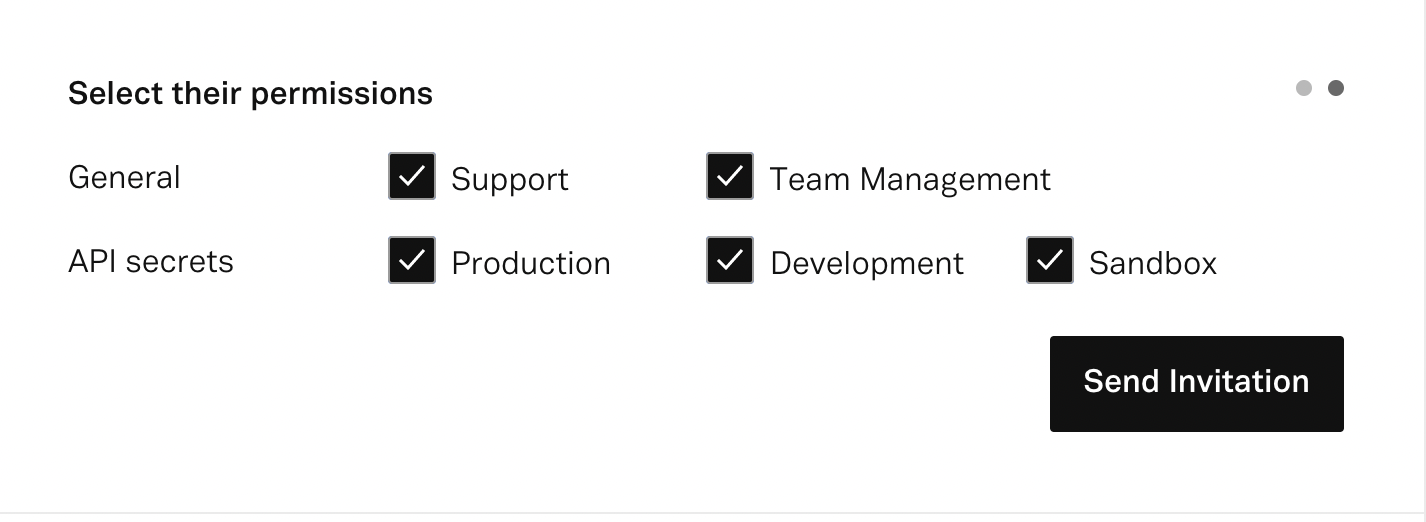
Assign the following permissions by selecting their checkboxes:
General →
-
Support(Ability to raise tickets on behalf of the Client in case of any issue)
-
Team Management(Ability to view the API Keys)
API Secrets →
-
Production, Sandbox
-
Click on Send Invitation to invite the representative