
-
Rest API Basics
-
Implementation Details
-
Get OAuth Token(Authenticate the user)
-
Request Header
-
Call Salesforce Standard API
-
Retrieve Verification Link (GET)
Rest API Basics
The Salesforce REST API is a lightweight and flexible way to interact with Salesforce using standard HTTP methods like GET, POST, PATCH, and DELETE. It supports JSON and XML formats, making it ideal for web and mobile integrations.
It is stateless, easy to use, and generally faster than SOAP for most use cases. For handling large data volumes, the Bulk API is recommended.
Key Points:
-
Uses the same data model as SOAP API
-
Shares API limits with SOAP
-
Requires basic understanding of web services, HTTP methods, and Salesforce objects
Implementation Details
Salesforce offers multiple APIs: REST (CRUD operations), Bulk (large data), Streaming (real-time events), and Custom Apex REST (complex logic).
Use Custom APIs when:
-
Working with multiple objects in one request
-
Implementing custom business logic
-
Standard APIs don’t meet requirements
Get OAuth Token(Authenticate the user)
To allow a client application to access Salesforce REST API resources, it must first be authorized using OAuth 2.0. This is achieved by configuring a Connected App in Salesforce.
-
Login to Salesforce
-
Create a new API-only user and provide Read and Create access to Bank Verification objects
-
Create External Client App by clicking on New External Client App
-
Setup > External Client App Manager > New External Client App
-
-
Populate required information
-
Mark the checkbox 'Enable OAuth' as true
-
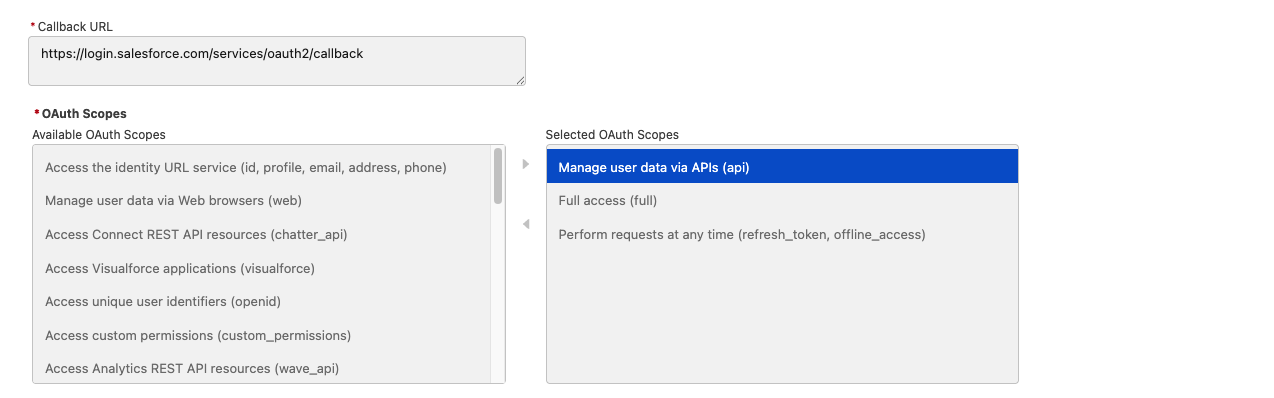
Populate the callback URL as 'https://login.salesforce.com/services/oauth2/callback'
-
Add below scopes under OAuth Scopes
-
Manage user data via APIs (api)
-
Full access (full)
-
Perform requests at any time (refresh_token, offline_access)
-
-
Click 'Create'
-
The External Client App will be created
-
Now, open the app and click on ‘Policies' tab and click 'Edit’
-
Under OAuth Flows and External Client App Enhancements, mark the checkbox for Enable Credentials Flow as true and add the username of the API-only user created above.
-
Under App Authorization, select ‘Immediately expire refresh token’ and click Save
-
Click ‘Settings' tab and under ‘OAuth Settings’, the button 'Consumer Key and Secret’ will appear.
-
Click on this button to get Consumer Key and Secret
-
Get the OAuth token using below cURL.
|
cURL Example |
|
curl --location 'https://yourInstance.salesforce.com/services/oauth2/token' \
{
|
Call Salesforce Standard API - Salesforce provides multiple services and endpoints. We will only cover 2 services and endpoints which are useful.
Post - Create a new Bank verification Record.
Endpoint - /services/data/v57.0/sobjects/bankconnect__Bank_Verification__c/
|
cURL Example |
|
curl https://yourInstance.salesforce.com/services/data/v57.0/sobjects/bankconnect__Bank_Verification__c/ \
Sample Response
|
Retrieve Verification Link (GET) - Once the Bank Verification record is created, you can fetch the Verification Link field using the record ID returned in the POST response.
Step 1: Identify Field API Name
Example: Bank_Verification_URL__c (Sample Field API Name)
Step 2: GET Request
Endpoint - GET /services/data/v57.0/sobjects/bankconnect__Bank_Verification__c/{recordId}?fields=Bank_Verification_URL__c
|
cURL Example |
|
curl https://yourInstance.salesforce.com/services/data/v57.0/sobjects/bankconnect__Bank_Verification__c/a01XXXXXXXXXXXX \
Sample Response {
|