
This document provides a comprehensive guide to the Identity Verification process and the various checks performed to assess the authenticity and risk of a user’s identity. It serves as both a reference and an operational guide for business users and administrators.
To View the IDV Dashboard
Steps:
-
Open the Bank Verification record in Salesforce.
-
Click on the Identity verification tab
-
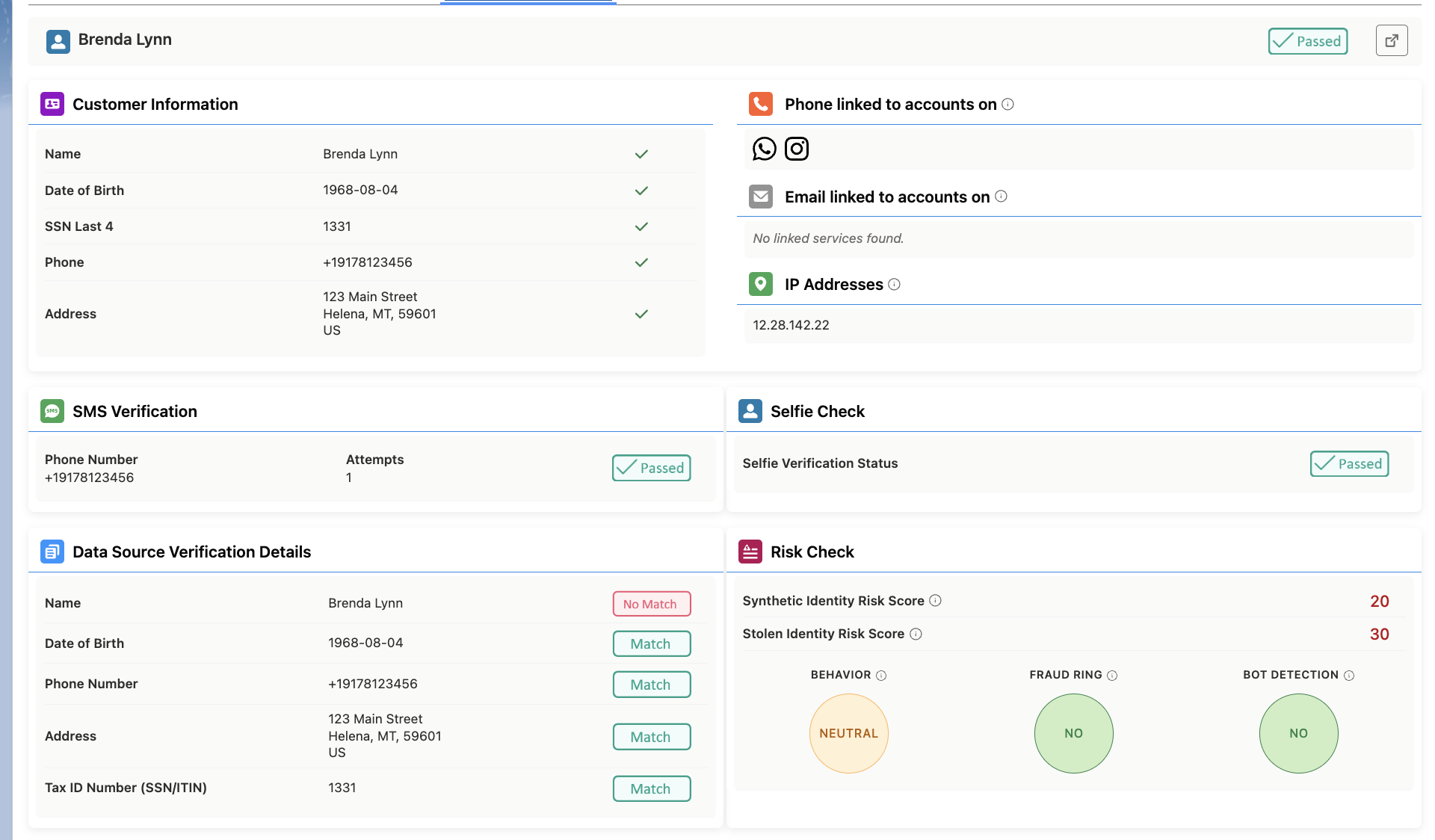
You will see a Dashboard showing the results of the verification.
To view the Identity Verification Results
Steps:
-
Open the Bank Verification record in Salesforce.
-
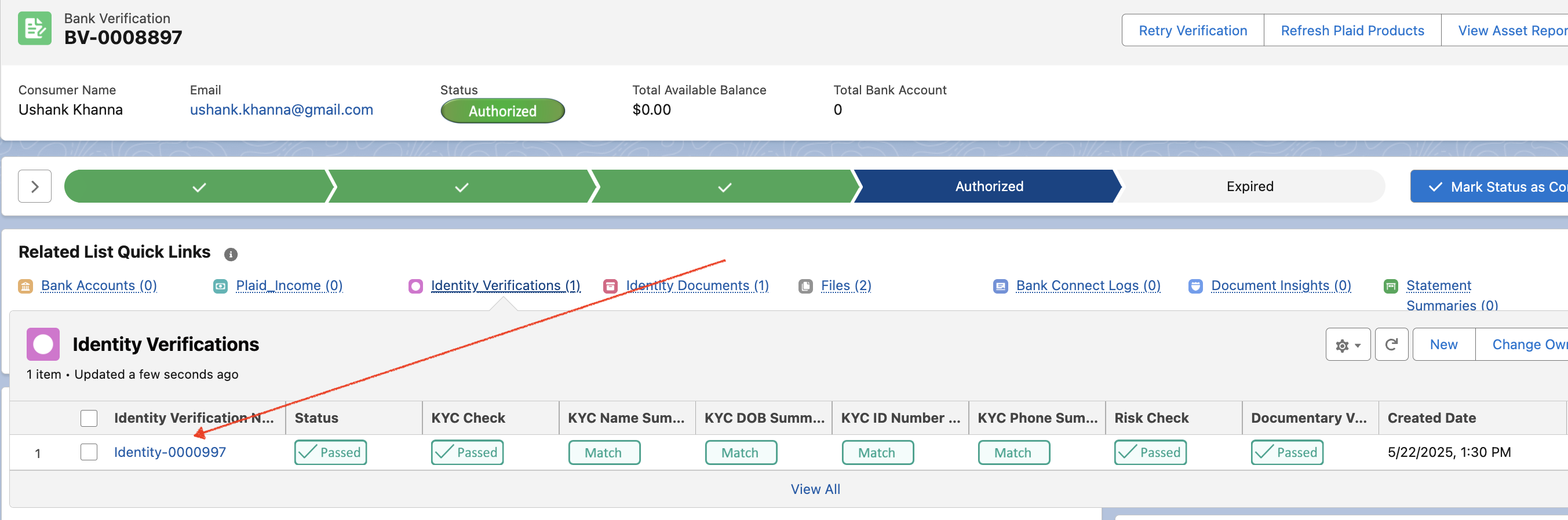
Scroll to the Related section.
-
Locate the Identity Verifications list.
-
Click the linked record name to open and view full details.
1. Identity Verification Status Guide
|
Status |
Meaning |
|---|---|
|
active |
The verification process has started but is not yet complete. The user may have partially completed the steps but has not passed or failed. |
|
success |
The verification process is complete and the user has passed all required steps in the configured template. |
|
failed |
The user did not pass one or more required steps and was instructed to contact support. |
|
expired |
The verification process was left incomplete for too long and was automatically marked as expired. (Note: Expiration is not currently active but will be enabled in the future.) |
|
canceled |
The verification process was stopped — either by a user through the dashboard or programmatically via API. The user may have partially completed it but did not pass or fail. |
|
pending_review |
The process flagged one or more items for review, based on the screening settings in the verification template. |
2. Identity Verification Step Statuses
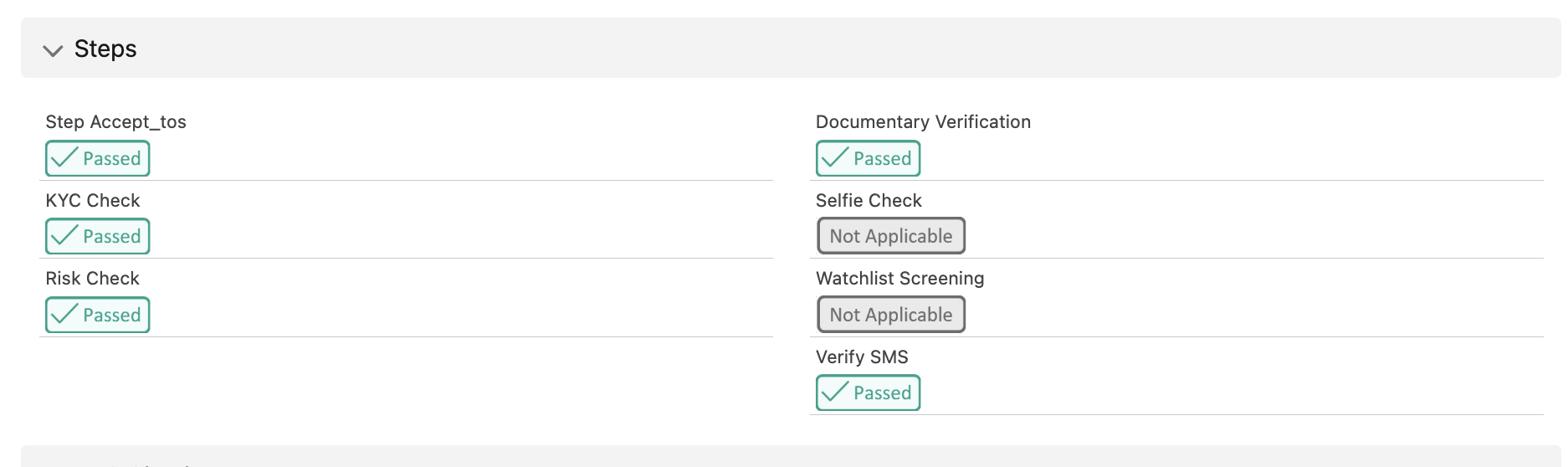
Each step in the Identity Verification process can have one of the following statuses:
|
Status |
Meaning |
|---|---|
|
success |
The step is complete and passed successfully. |
|
active |
The step is in progress but not yet complete. |
|
failed |
The step did not pass and requires user or support intervention. |
|
waiting_for_prerequisite |
The step is on hold until a prior required step is completed. |
|
not_applicable |
The step is not required for this verification process. |
|
skipped |
The step was intentionally bypassed. |
|
expired |
The step was not completed within the allowed time window. |
|
canceled |
The step was stopped, either manually or via API. |
|
pending_review |
The step is complete but has results that require manual review. |
|
manually_approved |
The step was approved by a reviewer after manual verification. |
|
manually_rejected |
The step was rejected by a reviewer after manual verification. |
Steps where these statuses apply:
-
accept_tos – User agrees to terms of service.
-
verify_sms – User confirms identity via SMS verification code.
-
kyc_check – Know Your Customer (KYC) compliance check.
-
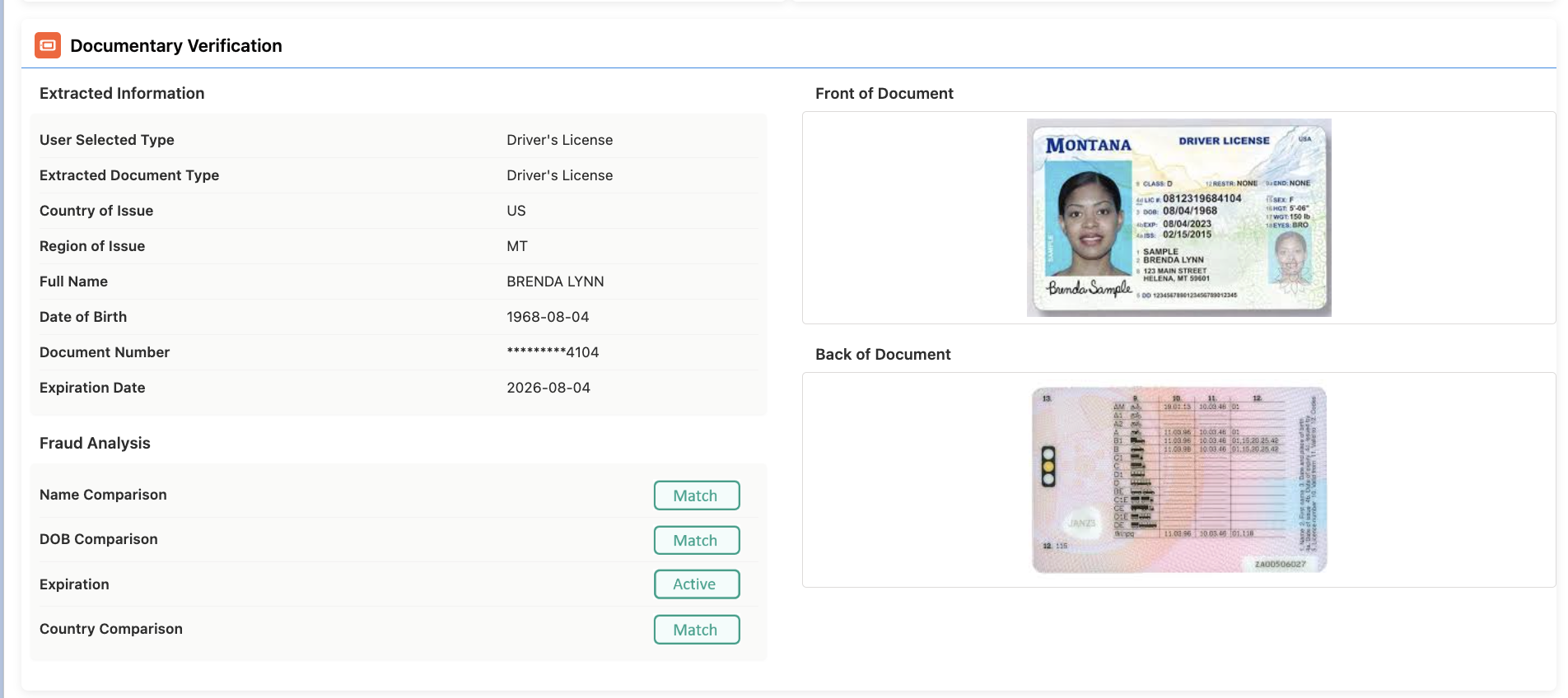
documentary_verification – Verification of uploaded ID documents.
-
selfie_check – Biometric face match between a selfie and ID documents.
-
watchlist_screening – Screening against global sanctions and watchlists.
-
risk_check – Risk assessment based on predefined criteria.
3. KYC Check (Data Source Verification) – Results Guide
This section provides details about the kyc_check step after it reaches a final status (success or failed).
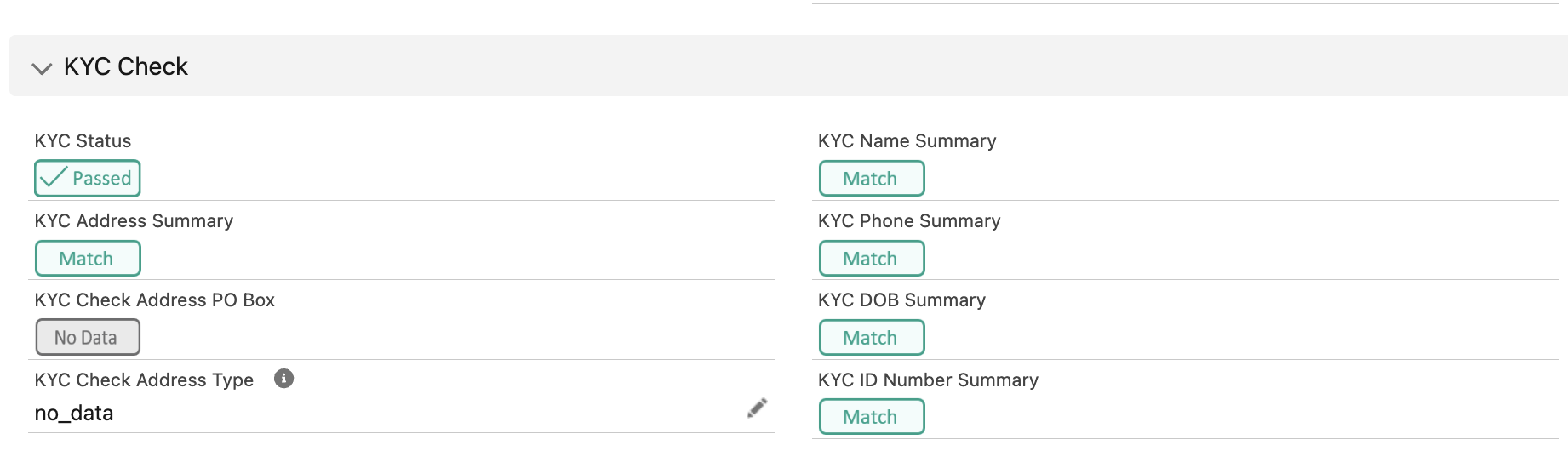
Overall Status
-
status – Matches the step’s final outcome (
success,failed, etc.).
3.1. Address Verification
-
summary – How the provided address matches external records:
-
match – Exact match found.
-
partial_match – Close match (e.g., “Knope” vs. “Knope-Wyatt”).
-
no_match – Found records but they don’t match.
-
no_data – No matching records found.
-
no_input – User did not provide address.
-
-
po_box – Whether the address is a P.O. Box:
-
yes, no, no_data.
-
-
type – Address type:
-
residential, commercial, no_data.
-
3.2. Name Verification
-
summary – Same match types as Address Verification.
3.3. Date of Birth Verification
-
summary – Same match types as Address Verification.
3.4. ID Number Verification
-
summary – Same match types as Address Verification.
3.5. Phone Number Verification
-
summary – Same match types as Address Verification.
-
area_code – Same match types as Address Verification.
📌 Quick Meaning of Match Types
|
Value |
Meaning |
|---|---|
|
match |
Exact match with external data. |
|
partial_match |
Close but not exact match. |
|
no_match |
Mismatch with found external data. |
|
no_data |
No records found to compare. |
|
no_input |
No user data provided for verification. |
4. Risk Check – Results Guide
The risk_check step evaluates potential fraud risk based on user behavior and system signals during the Identity Verification process.
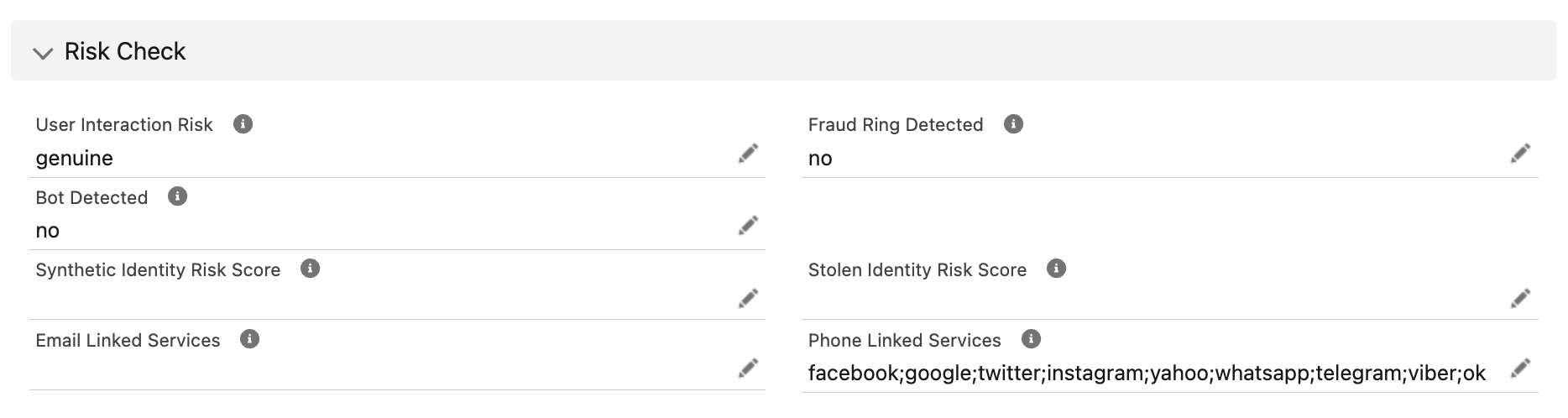
4.1. Overall Step Status
-
status – Indicates the current or final state of the risk check.
Possible values:
success, active, failed, waiting_for_prerequisite, not_applicable, skipped, expired, canceled, pending_review, manually_approved, manually_rejected.
4.2. Behavior Analysis (when available)
|
Field |
Meaning |
|---|---|
|
user_interactions |
Assesses how familiar the user is with their personal data based on behavior during the session. |
|
High familiarity – low fraud likelihood. |
|
Mixed signals – insufficient evidence to confirm risk. |
|
Low familiarity – high fraud likelihood. |
|
Not enough data to assess. |
|
Field |
Meaning |
|---|---|
|
fraud_ring_detected |
Indicates whether the user appears connected to coordinated fraud activity. |
|
Fraud ring activity detected. |
|
No fraud ring activity detected. |
|
Not enough information to determine. |
|
Field |
Meaning |
|---|---|
|
bot_detected |
Detects whether automated (bot) activity occurred during the session. |
|
Bot activity detected. |
|
No bot activity detected. |
|
Not enough information to determine. |
4.3. Linked Services
The linked_services field lists online platforms where a given email address or phone number has been detected as having accounts or recorded activity. This can help assess the authenticity, digital footprint, and potential risk profile of a user.
4.3.1 Linked Services for Email
-
Type:
[string]– List of detected platforms associated with the provided email. -
Usage:
-
High presence across reputable platforms may indicate a well-established digital identity.
-
Presence on high-risk or adult-related sites may require additional scrutiny.
-
Example: ["facebook", "linkedin", "google", "netflix"]
4.3.2 Linked Services for Phone
-
Type:
[string]– List of detected platforms associated with the provided phone number. -
Usage:
-
Confirms whether the phone number is actively used across online platforms.
-
Helps detect possible synthetic identities or burner numbers if no matches are found.
-
Example: ["whatsapp", "telegram", "instagram"]
4.4. Identity Abuse Signals
The identity_abuse_signals object flags potential risks of identity fraud in U.S. verifications, focusing on synthetic and stolen identity indicators. Availability of these signals may vary based on collected information.
4.4.1. Synthetic Identity Check
-
Definition: A synthetic identity is a fictitious identity created by combining real and fake personal information.
-
Field:
synthetic_identity.score -
Value Range: 0 – 100
-
0–20: Very low likelihood of synthetic identity.
-
21–50: Moderate likelihood – consider additional verification.
-
51–100: High likelihood – strong fraud suspicion.
-
4.4.2. Stolen Identity Check
-
Definition: Indicates the likelihood that the personal information belongs to a real person but is being used fraudulently.
-
Field:
stolen_identity.score -
Value Range: 0 – 100
-
0–20: Very low likelihood of stolen identity.
-
21–50: Moderate likelihood – further review recommended.
-
51–100: High likelihood – strong fraud suspicion.
-