
This document provides a summary of the income verification results returned by Plaid. It outlines the financial information retrieved from a customer’s connected bank accounts, including income sources, deposit patterns, estimated earnings, and validation status. The goal of this report is to help users easily interpret Plaid’s income data to support decision-making processes such as credit evaluation, underwriting, or financial assessment.
To view the Income Verification Results
Steps:
-
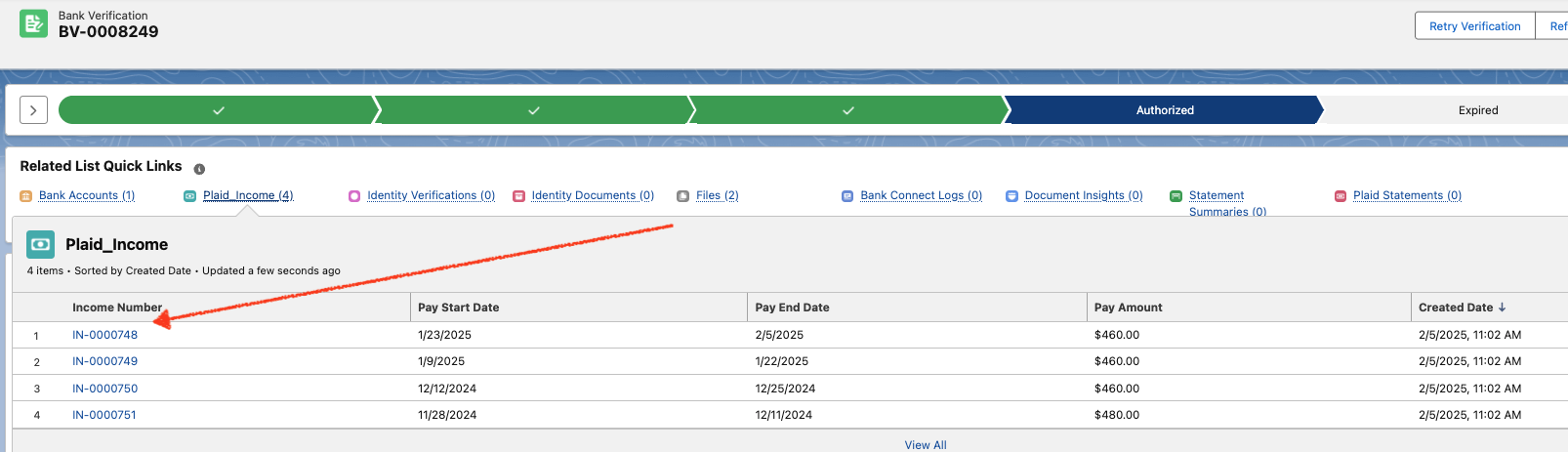
Open the Bank Verification record in Salesforce.
-
Scroll to the Related section.
-
Locate the Income Verifications list.
-
Click the linked record name to open and view full details.
Types of Income Verification Offered by Plaid
Plaid provides multiple ways to verify a person’s income, each designed for different scenarios, industries, and levels of detail required. These verification types can be used individually or in combination to improve accuracy and trustworthiness.
1. Bank Income Verification
What it is:
Uses actual bank transaction history to confirm income deposits from employers, benefits agencies, or other sources.
How it works:
-
The user securely connects their bank account(s) to Plaid.
-
Plaid scans the account’s transaction history (typically 90–365 days).
-
Income streams, frequency, and amounts are detected and summarized.
It retrieves income-related information from a user’s linked bank accounts. It is used to verify a person’s income based on actual bank transaction history, rather than relying solely on self-reported data or uploaded documents.
1.1 Key Information Provided
|
Category |
Details |
|---|---|
|
Income Streams |
List of employers, benefits providers, or other sources of income detected from bank deposits. |
|
Deposit History |
Historical record of income transactions, including amounts and dates. |
|
Income Amounts |
Calculated average income per pay period (weekly, bi-weekly, monthly). |
|
Income Stability |
Whether income is received regularly and consistently over time. |
|
Employer Information |
Where identifiable, Plaid may include the name of the employer or payment source. |
|
Transaction Details |
Information about each income deposit, such as transaction ID, description, and account used. |
2. Payroll Income Verification
What it is:
Connects directly to a person’s employer’s payroll system to fetch verified pay data.
How It Works
-
User connects payroll account
Through Plaid Link, the user logs in to their payroll provider (like ADP, Paychex, Gusto, or Workday). -
Plaid retrieves payroll records
Plaid securely accesses the user’s payroll data via direct integration with the provider. -
Data is returned via this endpoint
The/credit/payroll_income/getendpoint delivers structured JSON data containing the user’s verified payroll history.
It returns official payroll information about a person’s income, employment, and work history. The data is collected only after the user has securely connected their payroll account to Plaid and given permission for access.
Instead of relying on bank deposits (which only show incoming amounts), this method retrieves full pay records directly from the source, which can include:
-
Gross and net pay amounts
-
Pay frequency (weekly, biweekly, monthly, etc.)
-
Employer details (company name, address)
-
Job title and employment status
-
Historical pay periods
-
Tax withholdings and deductions
3. Document-Based Income Verification
What it is:
Analyzes uploaded income documents like pay stubs, tax returns, or benefits statements.
It returns official payroll information about a person’s income, employment, and work history. The data is collected only after the user has securely connected their payroll account to Plaid and given permission for access.
Instead of relying on bank deposits (which only show incoming amounts), this method retrieves full pay records directly from the source, which can include:
-
Gross and net pay amounts
-
Pay frequency (weekly, biweekly, monthly, etc.)
-
Employer details (company name, address)
-
Job title and employment status
-
Historical pay periods
-
Tax withholdings and deductions