Overview
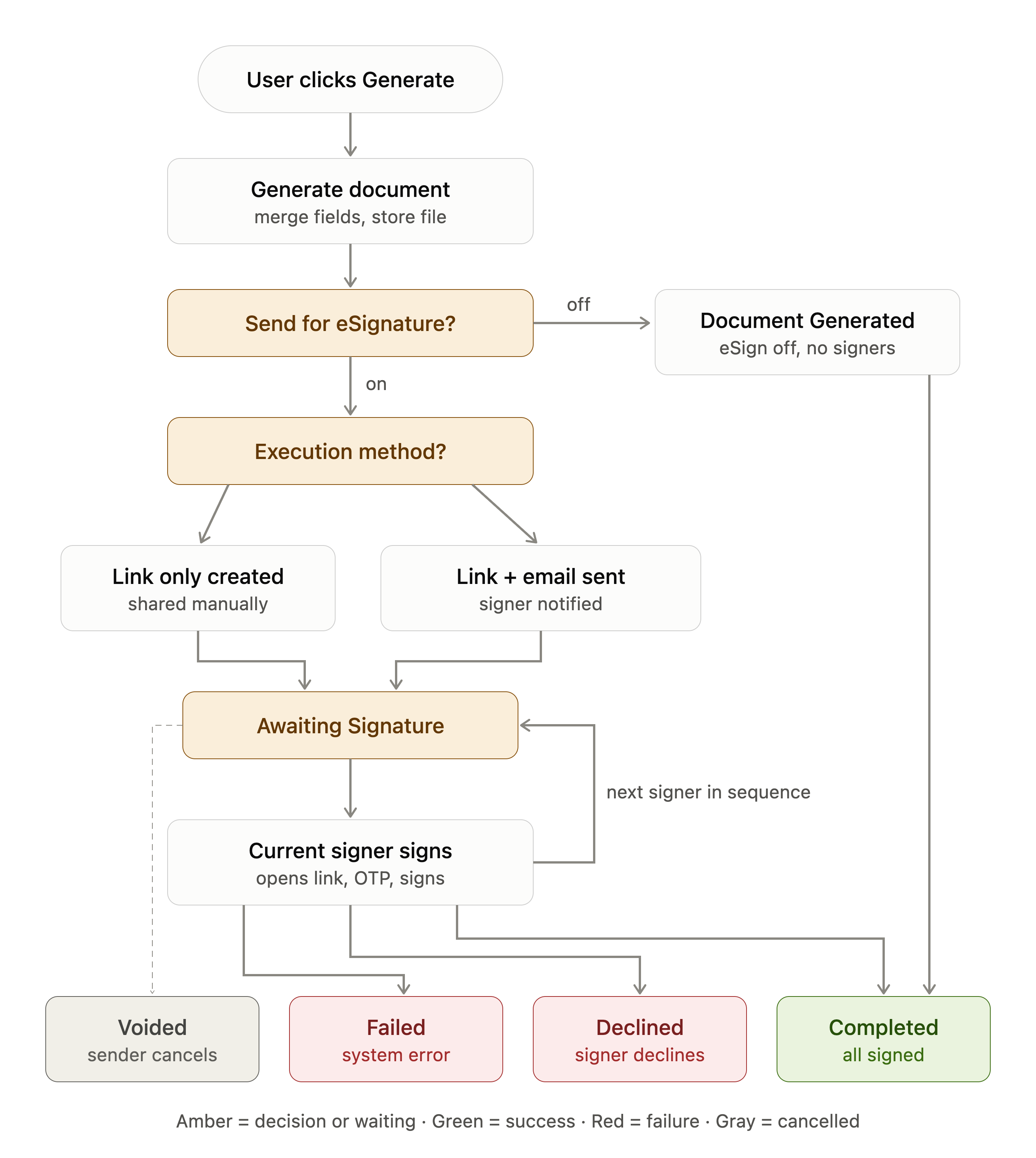
The Document Workflow is the runtime backbone of the DocGen & eSign generation module. Every generated document is anchored to one Document_Workflow__c record, which tracks the document from the moment it is merged, through the signing queue, to final completion, decline, void, or failure. This page describes each lifecycle stage, the decision points (eSignature on/off, execution method), the signer loop, and every terminal status.
Detailed Flow
Step 1 — Initiation
-
User clicks the Generate button on the record page (
documentGenerationScreenLWC). -
User selects a Document Template
Step 2 — Template action check: Send Document for eSignature?
-
OFF (generate-only): Status = Document Generated → post-processing → Status = Workflow Completed.
-
ON: continue to the execution-method check.
Step 3 — Execution method check: Generate Doc / Generate Link
-
Generate Link only: a signing link is created for the first signer . No email is sent — the sender shares the link manually. Status = Awaiting Signature.
-
Generate Doc & Send: the signing link is created and an email notification is sent to the signer. Status = Awaiting Signature.
Step 4 — Signer loop (repeats per signer, in sequence order)
-
The current signer opens their link and signs.
-
If more signers remain: the next signer in
Signer_Sequence__corder gets their link (and notification, per execution method) — the workflow stays in Awaiting Signature and the loop repeats. -
If this was the last signer: Status = Workflow Completed; post-processing runs (Salesforce field updates from signed data, record creation, vaulting of the signed file).
Exit paths (any time before completion)
-
Signer declines → Status = Signature Declined (terminal).
-
Sender voids the workflow → Status = Voided (terminal).
-
System/signer error → Status = Failed (terminal).
-
Recovery from any terminal state is by regenerating, which creates a fresh workflow.
Lifecycle Diagram