
This document serves as a comprehensive guide for reviewing and interpreting Bank Verification results retrieved through Plaid and displayed in Salesforce. It outlines where and how to access the verification records, explains the different result categories (e.g., Auth, Assets, Transactions, Balances, Investments, Identity, Liabilities, and Statements), and provides step-by-step instructions for navigating related records such as Bank Accounts, Transactions, Holdings, Owners, and Statements.
🔍 Review Verification Results
After running the Bank Verification Request, you will see a Bank Verification record in the related section of the Source object.
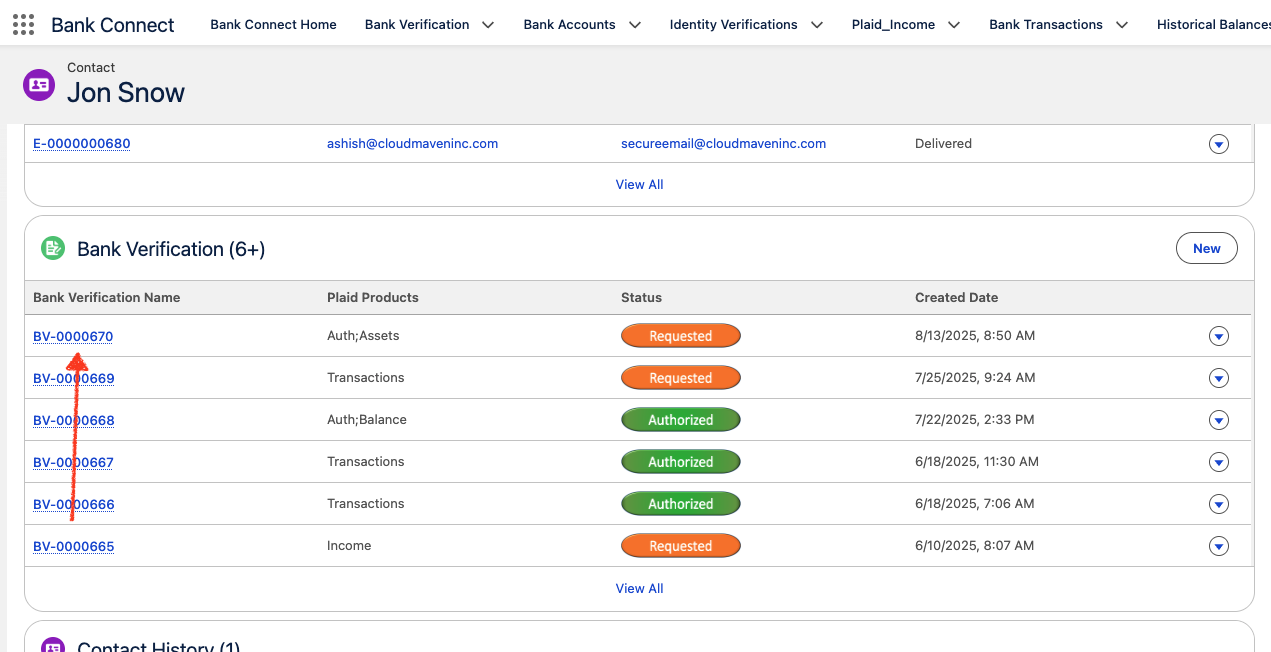
In the Related Section click on the respective Bank Verification record.
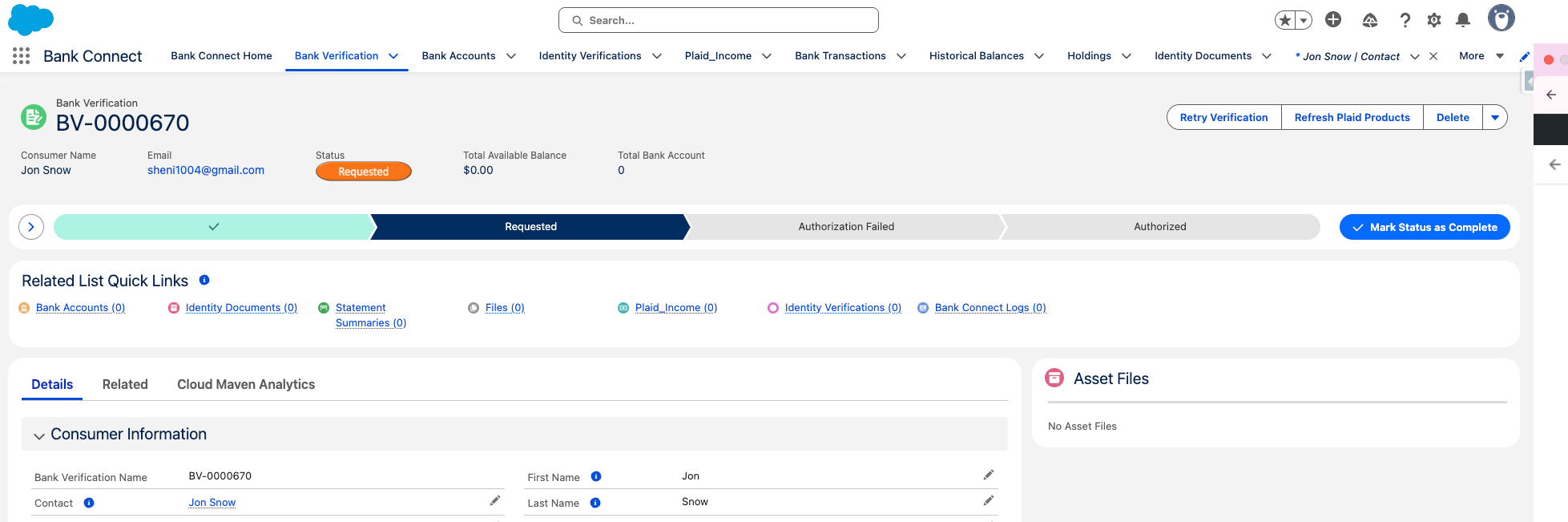
View Bank Verification Results
1. Auth Results
Steps to View Auth Results
Results are captured in the below 2 Objects
-
Bank Verification
-
Bank Account
1.1 In the Related section of the Bank Verification Record, View the Bank Account Record
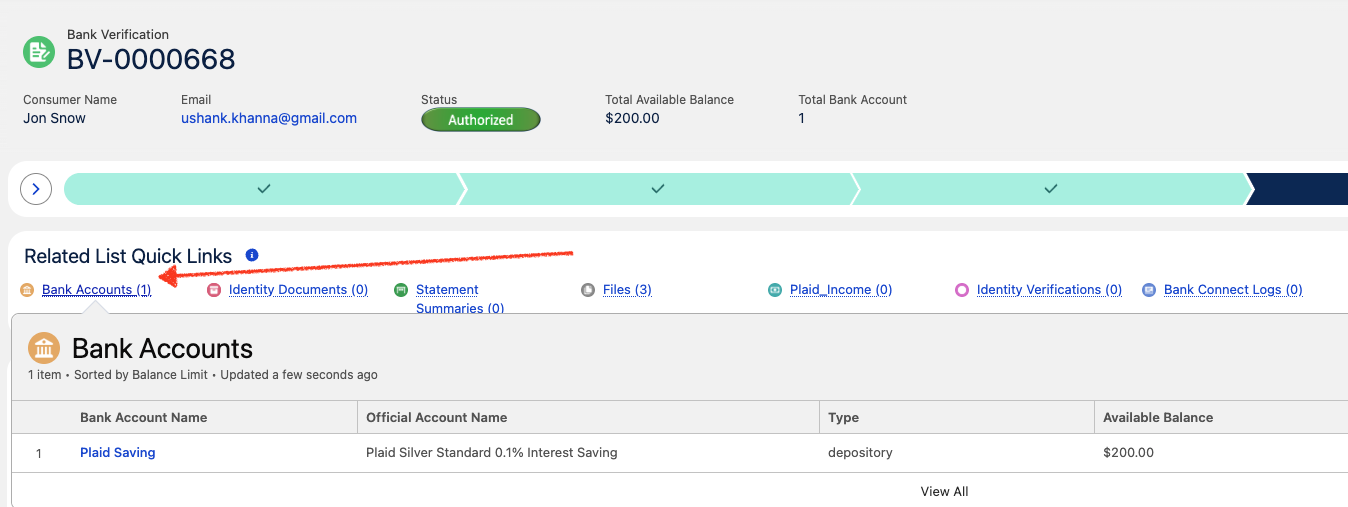
1.2 Click on the Bank Account Record to view the Account details.
United States (US) Accounts
For U.S.-based accounts, the primary identifiers include:
-
Account Number – A unique number identifying the specific bank account.
-
Routing Number – A nine-digit code used to identify the financial institution for domestic transfers.
-
Wire Routing Number – A separate routing code specifically used for incoming international wire transfers to ensure accurate fund routing.
Canada Accounts
In Canada, the routing information follows a different structure than in the U.S. and is divided into two components:
-
Transit Number (Branch Number) – A five-digit number identifying the specific bank branch.
-
Institution Number – A three-digit number that identifies the financial institution.
These two numbers are typically presented together and are required to process domestic and international transactions.
United Kingdom (UK) Accounts
UK bank accounts operate within both domestic and international payment frameworks:
-
BACS Sort Code – A six-digit number used for domestic transfers via the Bankers Automated Clearing Services (BACS), commonly used for payroll, vendor payments, and recurring transfers within the UK.
-
IBAN (International Bank Account Number) – Used for cross-border transactions, particularly within the Single Euro Payments Area (SEPA) network.
UK accounts support:-
BACS transfers for domestic transactions (especially payroll).
-
SEPA transfers for cross-border payments within the SEPA region.
-
Europe Accounts
In European Economic Area (EEA) member states, including Eurozone countries and the UK:
-
BIC (Bank Identifier Code) / SWIFT Code – Identifies the recipient’s bank during international transactions.
-
IBAN – The standardized international bank account number used in combination with the BIC for secure and accurate cross-border fund transfers.
These details are essential for processing both SEPA (intra-European) and SWIFT (global) transactions.
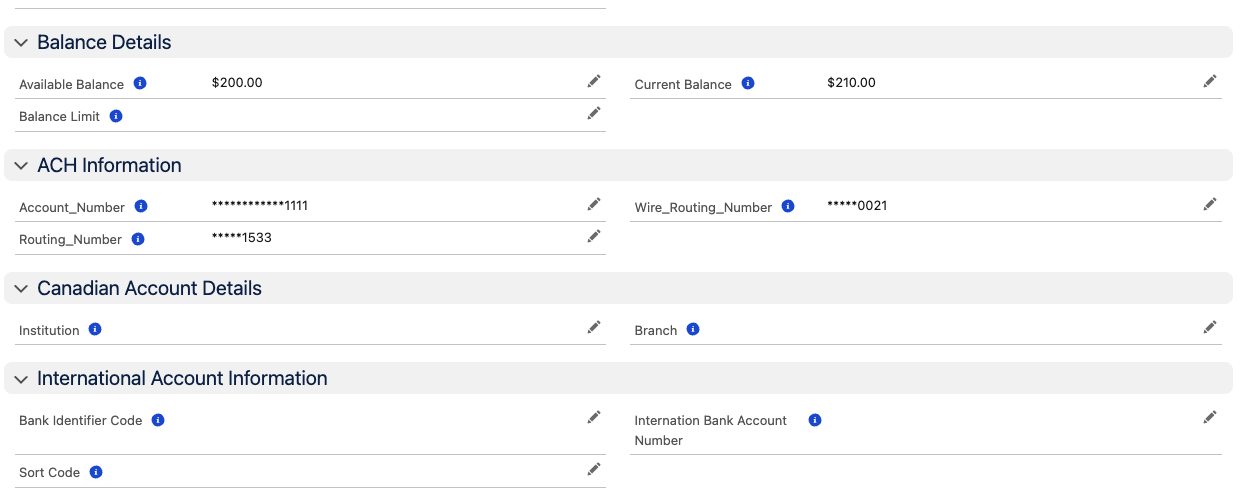
1.3 Error Handling
In the event that the authentication process is unsuccessful, the Auth Status on the Bank Verification record will be updated to “Failed.” The Auth Status Description field will display a clear explanation of the failure, providing relevant details to help identify the cause—such as incorrect credentials, expired session, connection timeout, or institution service unavailability.
2. Assets Results
Steps to View Asset Results
Results are captured in below objects:
-
Bank verification
-
Bank Account
-
Bank Transactions
-
Historical Balance
-
Owner
-
Owner Addresses
-
Owner Contact Details
2.1 In the Related section of the Bank Verification Record, View the Bank Account Record
2.2 View Bank Account Details
The Available Balance represents the amount of funds that can be withdrawn from the account, as determined by the financial institution. This value is provided by the institution and may vary based on account type:
-
Credit Accounts – The available balance is generally calculated as:
Credit Limit – Current Balance – Pending Outflows + Pending Inflows
This represents the remaining credit available for use after accounting for purchases, payments, and transactions in progress. -
Depository Accounts (e.g., checking or savings) – The available balance is typically:
Current Balance – Pending Outflows + Pending Inflows
It does not include any overdraft limit. This reflects the actual cash accessible for withdrawal, excluding funds reserved for pending transactions. -
Investment or Brokerage Accounts – For investment-type accounts (or brokerage accounts in API versions 2018-05-22 and earlier), the available balance equals the total cash available to withdraw as reported by the institution.
Important:
Not all financial institutions calculate or provide an available balance. In such cases, the available balance will be returned as null in the system.
2.3 View Transactions
You can review the transaction history linked to a specific bank account directly within the system.
To view the details:
-
Navigate to the Bank Account record.
-
In the Related section, locate the list of Bank Transaction records associated with the account.
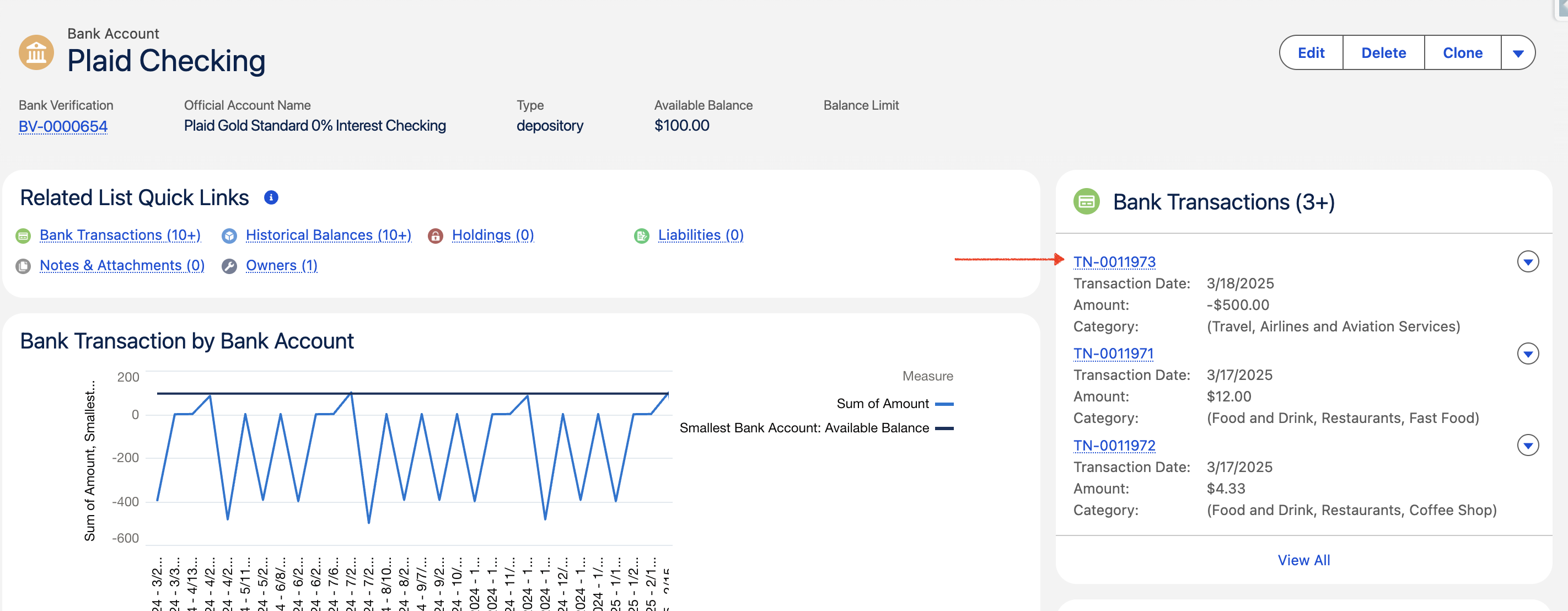
-
Click on any transaction record to open and view its details, including transaction date, amount, description, and any additional metadata provided by the financial institution.
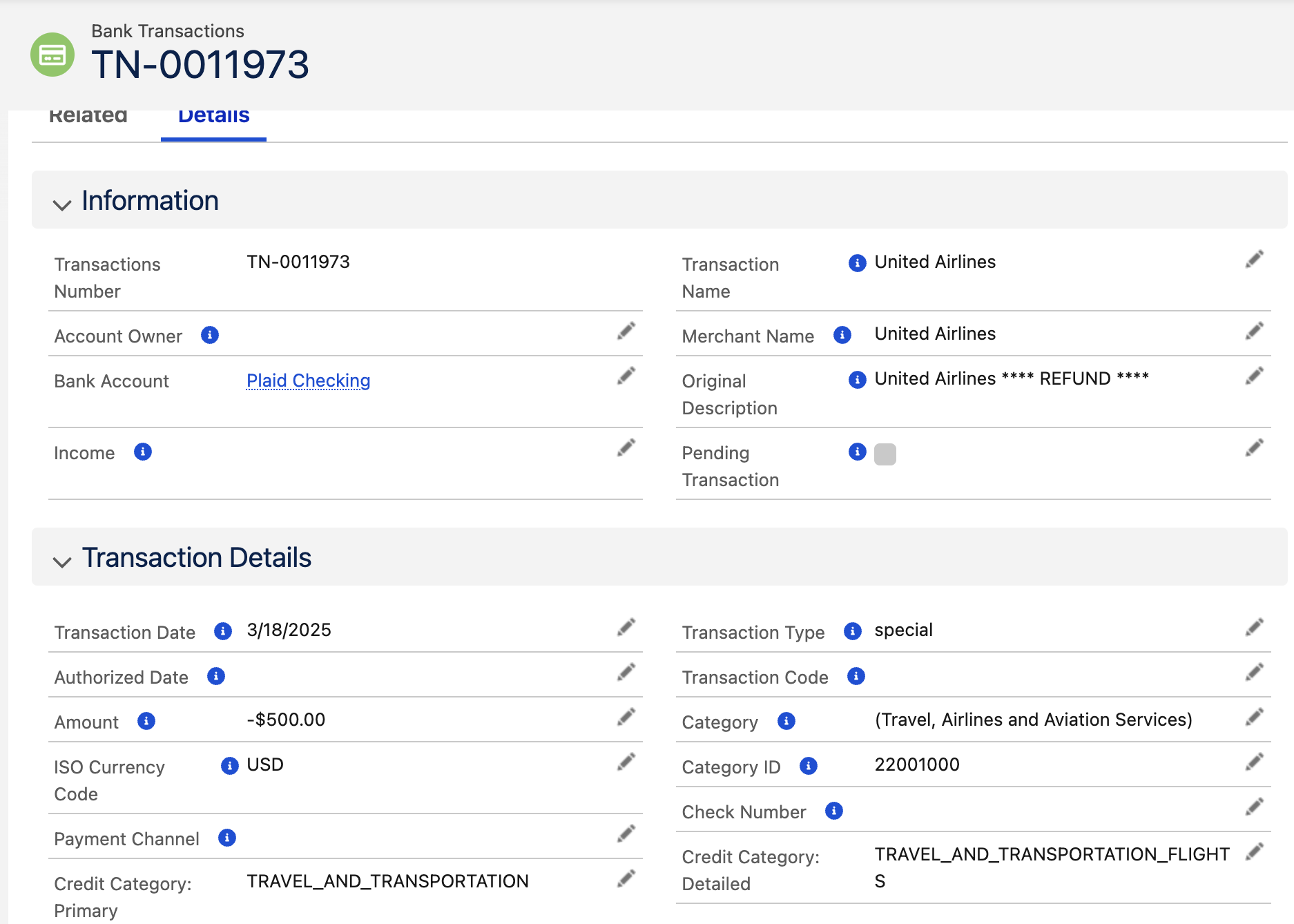
This allows users to quickly analyze account activity, verify specific transactions, and cross-check payment or deposit details as part of account verification or reconciliation processes..
2.4 View Historical Balance
This feature provides calculated data showing the account’s balance history over the specified time period requested. It allows users to:
-
Review how the balance has changed over time.
-
Identify trends, such as consistent deposits, withdrawals, or seasonal fluctuations.
-
Support decision-making processes, such as credit assessments, risk analysis, or financial planning.
To view the details:
-
Navigate to the Bank Account record.
-
In the Related section, locate the list of Historical Balances records associated with the account.
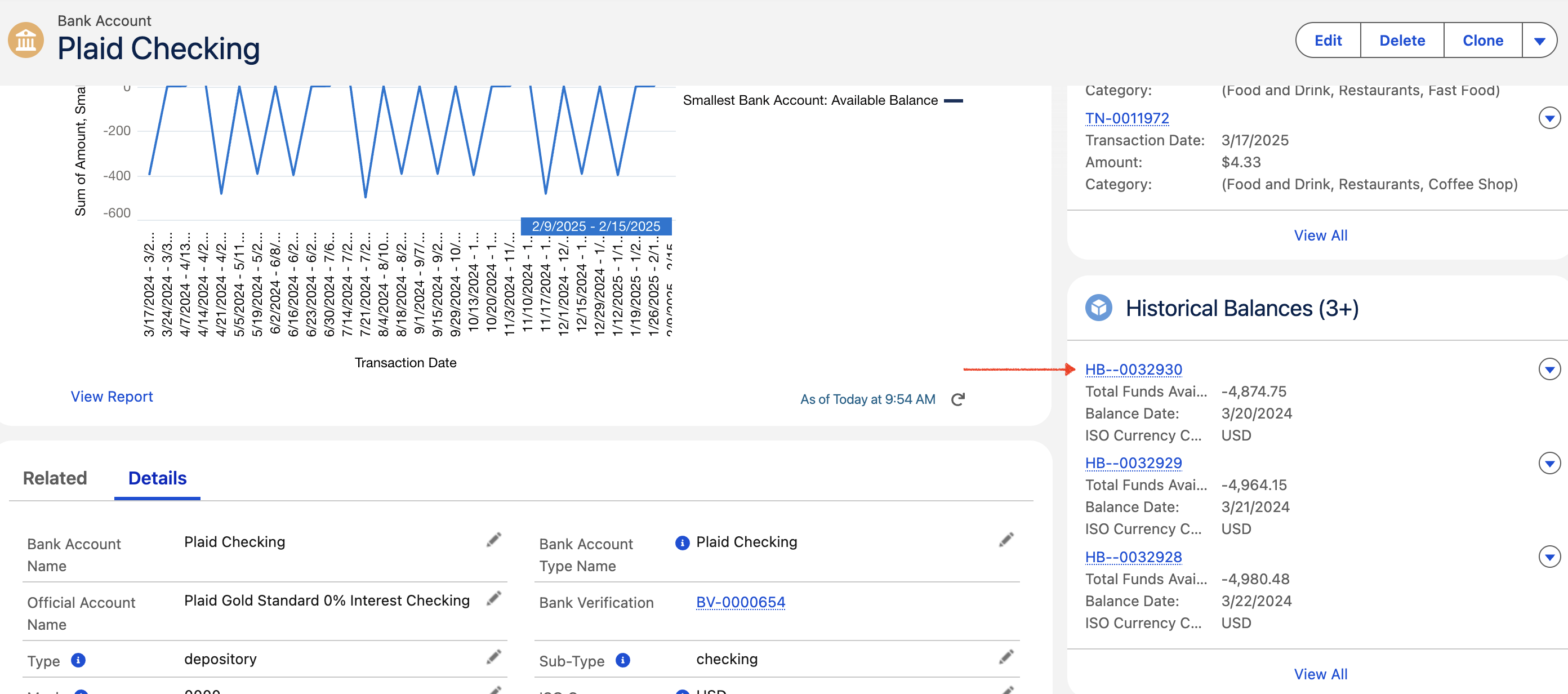
-
Click on any Historical Balance to open and view the ending day balance for the specific date.
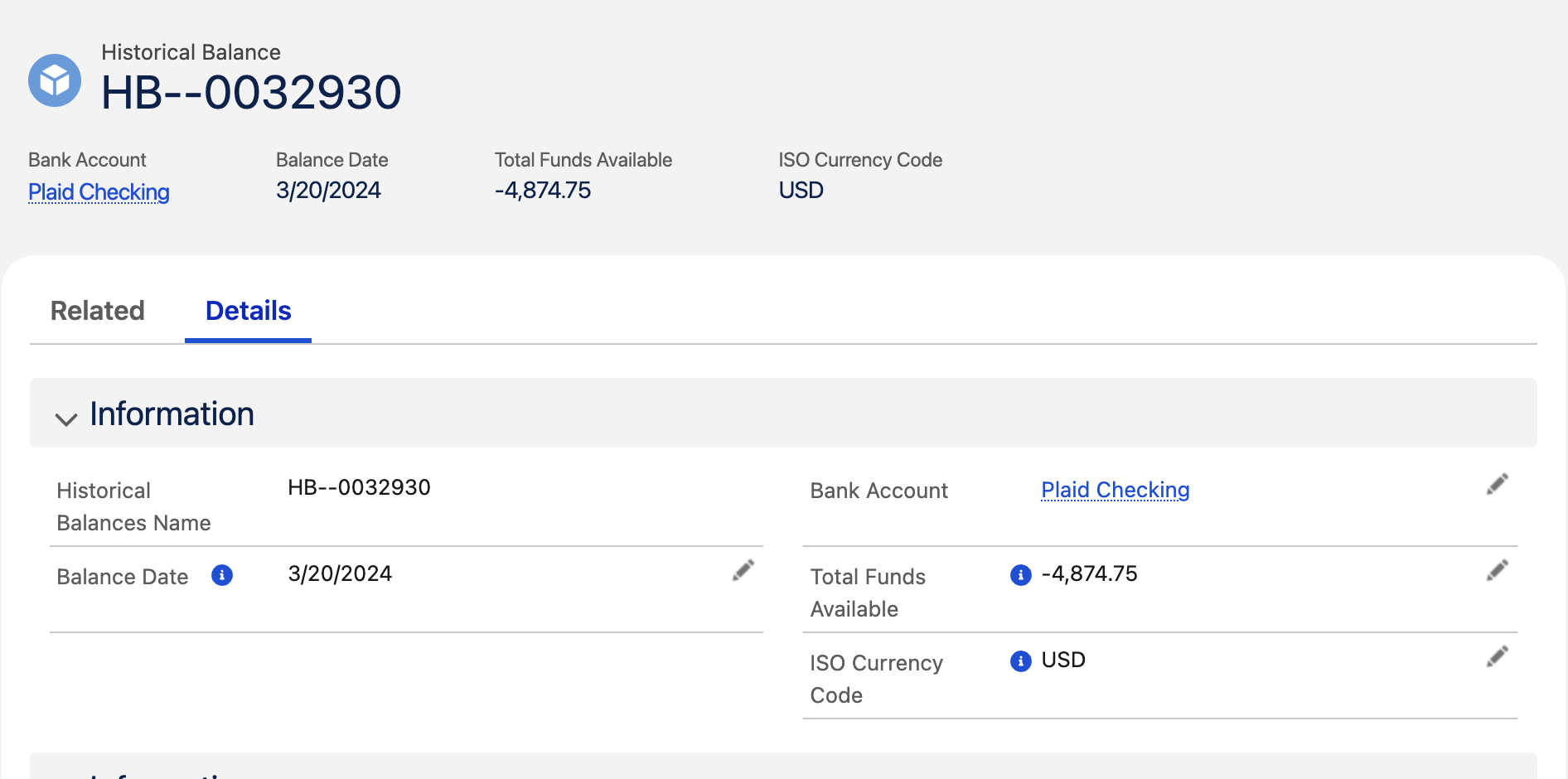
The historical balance data is derived from the transaction history provided by the financial institution and reflects the balance at various points in time during the selected duration.
2.5 View Owners
Navigate the the Owners records in the Related Section of the Bank Account
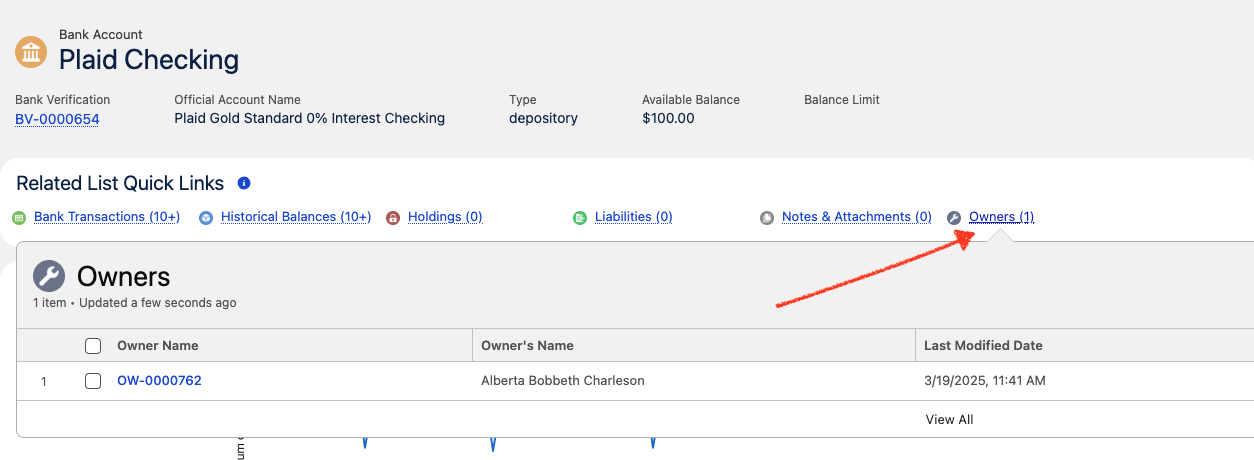
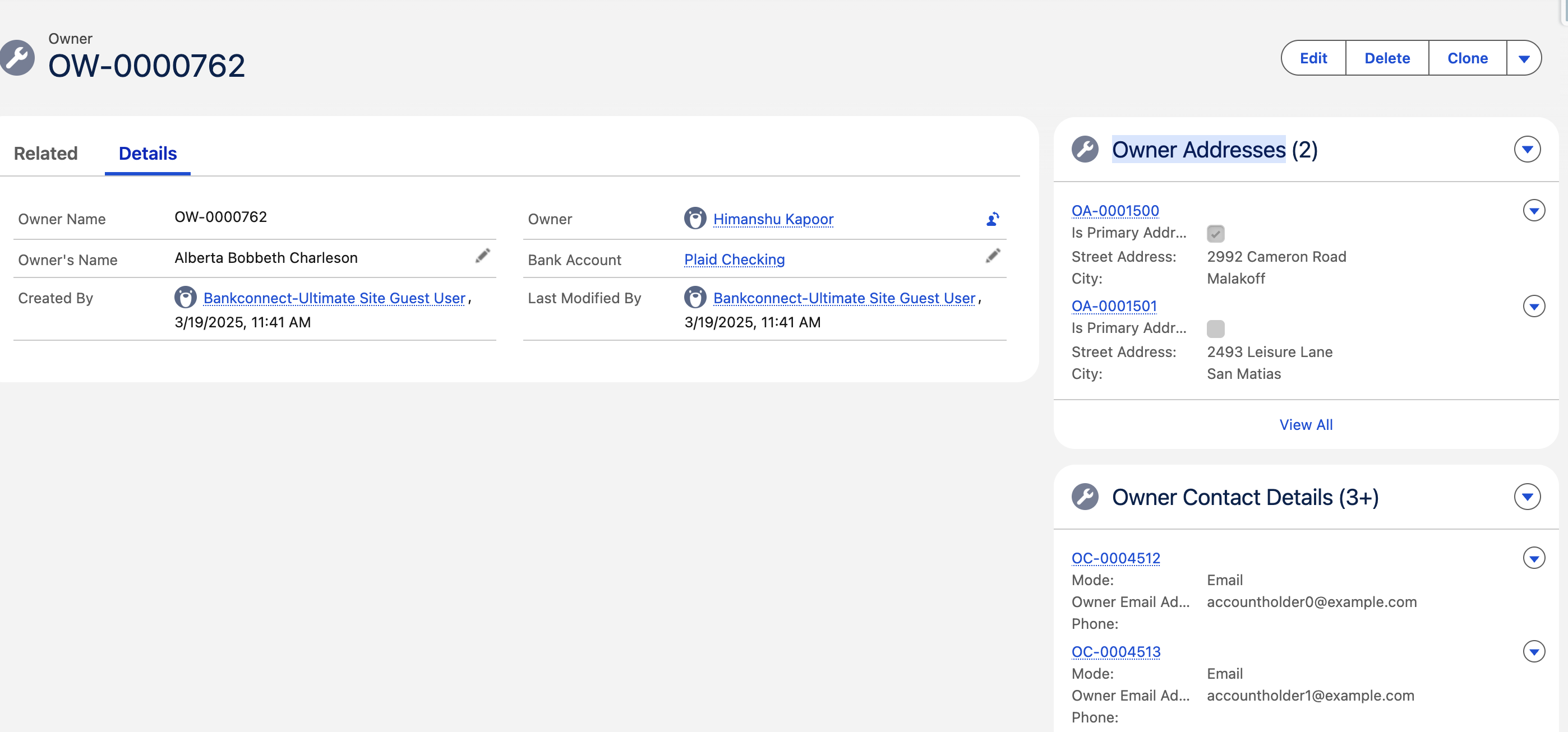
The Account Owner Information section contains details provided by the financial institution regarding the individual(s) or entity that owns the account.
-
For personal accounts, this typically includes the account holder’s legal name.
-
For business accounts, the reported name may be either:
-
The name of the business entity, or
-
The name of the individual associated with the account,
depending on how the financial institution records the ownership.
-
To capture Owner Address and Owner Contact Details, we have seperate objects related to the Owner object.
2.6 View Asset Report in PDF Format
The Asset Report PDF is accessible in multiple locations for ease of reference:
-
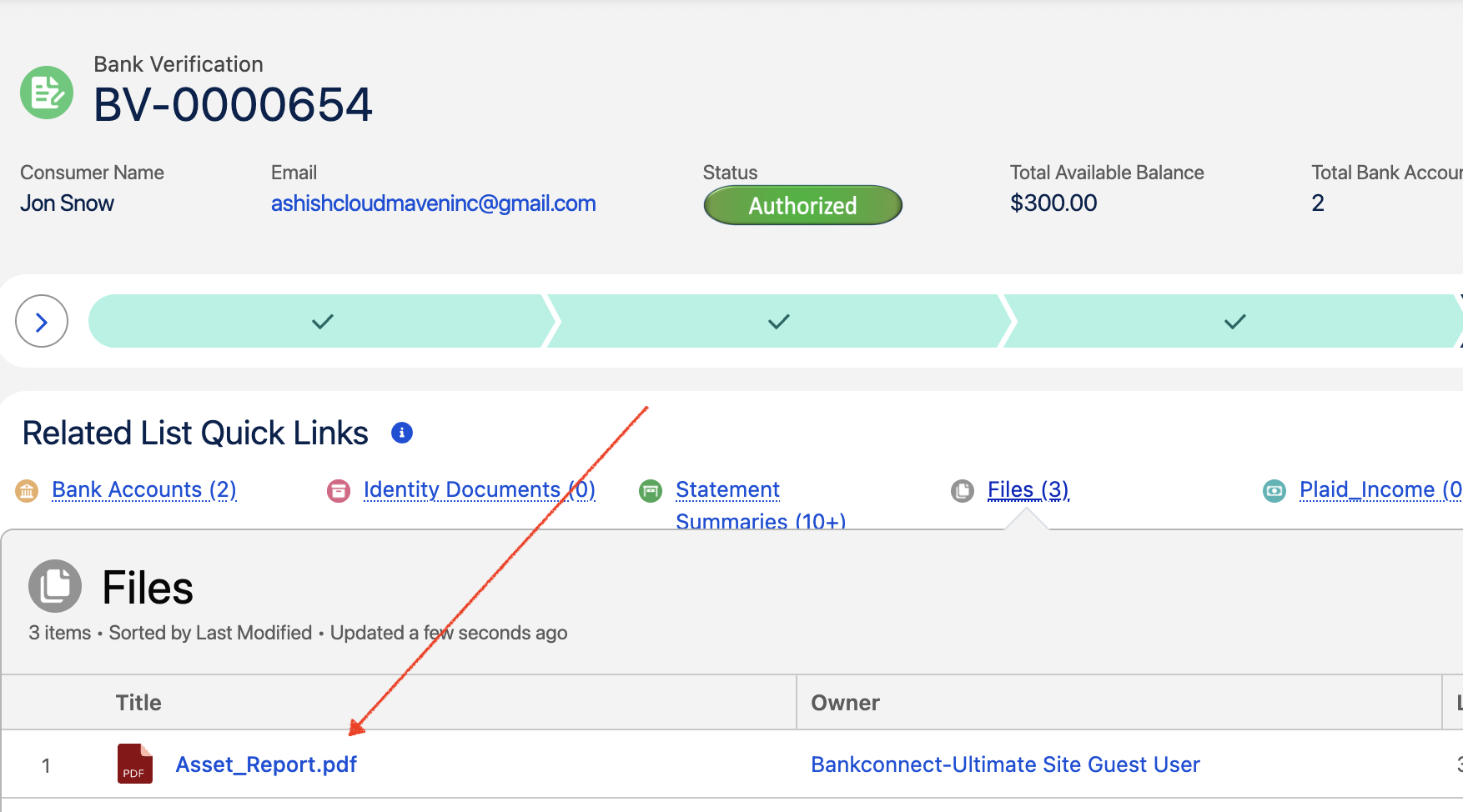
Bank Verification Record – Files Section
A copy of the report is stored under the Files section of the Bank Verification record for download and review.
-
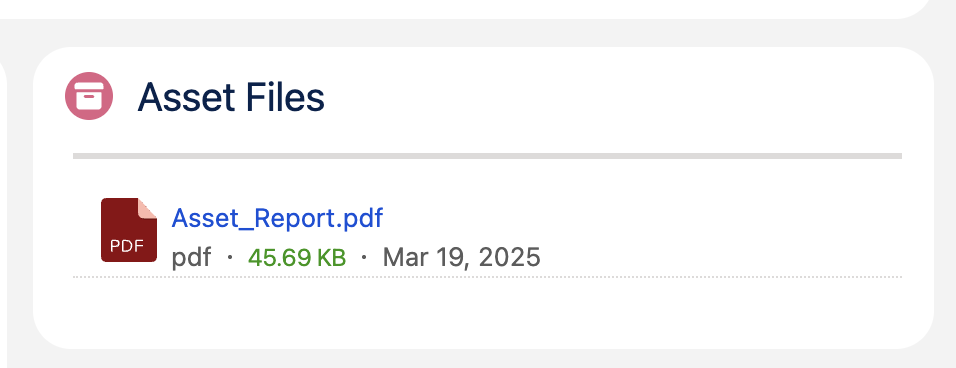
Bank Verification Record – Page Component
The report can also be viewed directly within a dedicated Asset Report PDF component on the Bank Verification record page, allowing users to access the information without navigating away.
-
Source Object Page
For additional convenience, the Asset Report PDF component can be configured to appear on the Source Object (e.g., Loan Application, Customer Profile, or other initiating record) from which the Bank Verification request originated. This enables business users to review the report in the context of the original request.
2.7 View Custom Asset Report PDF
2.8 View Cloud Maven Statistics
View Cloud Maven Analytics
3. Transaction Results
Steps to View Transaction Results
Results are captured in below objects:
-
Bank verification
-
Bank Account
-
Bank Transactions
3.1 In the Related section of the Bank Verification Record, View the Bank Account Record
3.2 View Bank Account Details
The Available Balance represents the amount of funds that can be withdrawn from the account, as determined by the financial institution. This value is provided by the institution and may vary based on account type:
-
Credit Accounts – The available balance is generally calculated as:
Credit Limit – Current Balance – Pending Outflows + Pending Inflows
This represents the remaining credit available for use after accounting for purchases, payments, and transactions in progress. -
Depository Accounts (e.g., checking or savings) – The available balance is typically:
Current Balance – Pending Outflows + Pending Inflows
It does not include any overdraft limit. This reflects the actual cash accessible for withdrawal, excluding funds reserved for pending transactions. -
Investment or Brokerage Accounts – For investment-type accounts (or brokerage accounts in API versions 2018-05-22 and earlier), the available balance equals the total cash available to withdraw as reported by the institution.
Important:
Not all financial institutions calculate or provide an available balance. In such cases, the available balance will be returned as null in the system.
3.3 View Transactions
You can review the transaction history linked to a specific bank account directly within the system.
To view the details:
-
Navigate to the Bank Account record.
-
In the Related section, locate the list of Bank Transaction records associated with the account.
-
Click on any transaction record to open and view its details, including transaction date, amount, description, and any additional metadata provided by the financial institution.
This allows users to quickly analyze account activity, verify specific transactions, and cross-check payment or deposit details as part of account verification or reconciliation processes..
4. Balance Results
Steps to View Balance Results
Results are captured in below objects:
-
Bank verification
-
Bank Account
4.1 In the Related section of the Bank Verification Record, View the Bank Account Record
4.2 View Bank Account Details
The Available Balance represents the amount of funds that can be withdrawn from the account, as determined by the financial institution. This value is provided by the institution and may vary based on account type:
-
Credit Accounts – The available balance is generally calculated as:
Credit Limit – Current Balance – Pending Outflows + Pending Inflows
This represents the remaining credit available for use after accounting for purchases, payments, and transactions in progress. -
Depository Accounts (e.g., checking or savings) – The available balance is typically:
Current Balance – Pending Outflows + Pending Inflows
It does not include any overdraft limit. This reflects the actual cash accessible for withdrawal, excluding funds reserved for pending transactions. -
Investment or Brokerage Accounts – For investment-type accounts (or brokerage accounts in API versions 2018-05-22 and earlier), the available balance equals the total cash available to withdraw as reported by the institution.
Important:
Not all financial institutions calculate or provide an available balance. In such cases, the available balance will be returned as null in the system.
5. Investment Results
Steps to View Investment Results
Results are captured in below objects:
-
Bank verification
-
Bank Account
-
Holdings
-
Investment Transactions
The Investments product allows you to obtain holding, security, and transactions data for investment-type accounts in financial institutions within the United States and Canada. This data can be used for personal financial management tools and wealth management analysis.
5.1 In the Related section of the Bank Verification Record, View the Bank Account Record
5.2 View Bank Account Details
The Available Balance represents the amount of funds that can be withdrawn from the account, as determined by the financial institution. This value is provided by the institution and may vary based on account type:
-
Credit Accounts – The available balance is generally calculated as:
Credit Limit – Current Balance – Pending Outflows + Pending Inflows
This represents the remaining credit available for use after accounting for purchases, payments, and transactions in progress. -
Depository Accounts (e.g., checking or savings) – The available balance is typically:
Current Balance – Pending Outflows + Pending Inflows
It does not include any overdraft limit. This reflects the actual cash accessible for withdrawal, excluding funds reserved for pending transactions. -
Investment or Brokerage Accounts – For investment-type accounts (or brokerage accounts in API versions 2018-05-22 and earlier), the available balance equals the total cash available to withdraw as reported by the institution.
Important:
Not all financial institutions calculate or provide an available balance. In such cases, the available balance will be returned as null in the system.
5.3 View Holdings and Securities
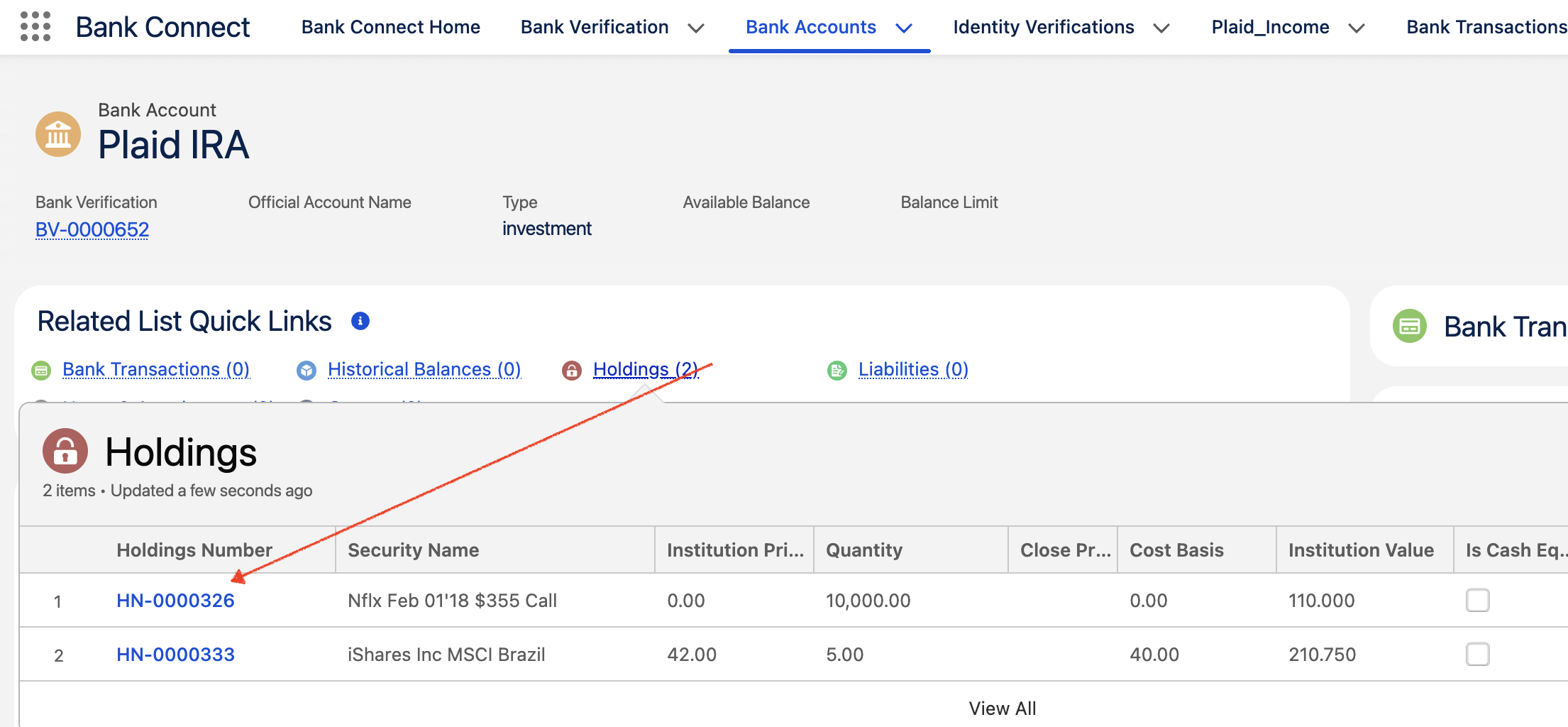
This section displays the holdings linked to investment accounts associated with the Item. Each Holding Record contains detailed information about the securities within the holding, as provided by the financial institution.
To view holding details:
-
Navigate to the Bank Account record.
-
In the Related section, find the list of Holding records tied to the account.
-
Click on any Holding record to open and review the details of the securities held, including security name, type, quantity, market value, and other institution-provided data.
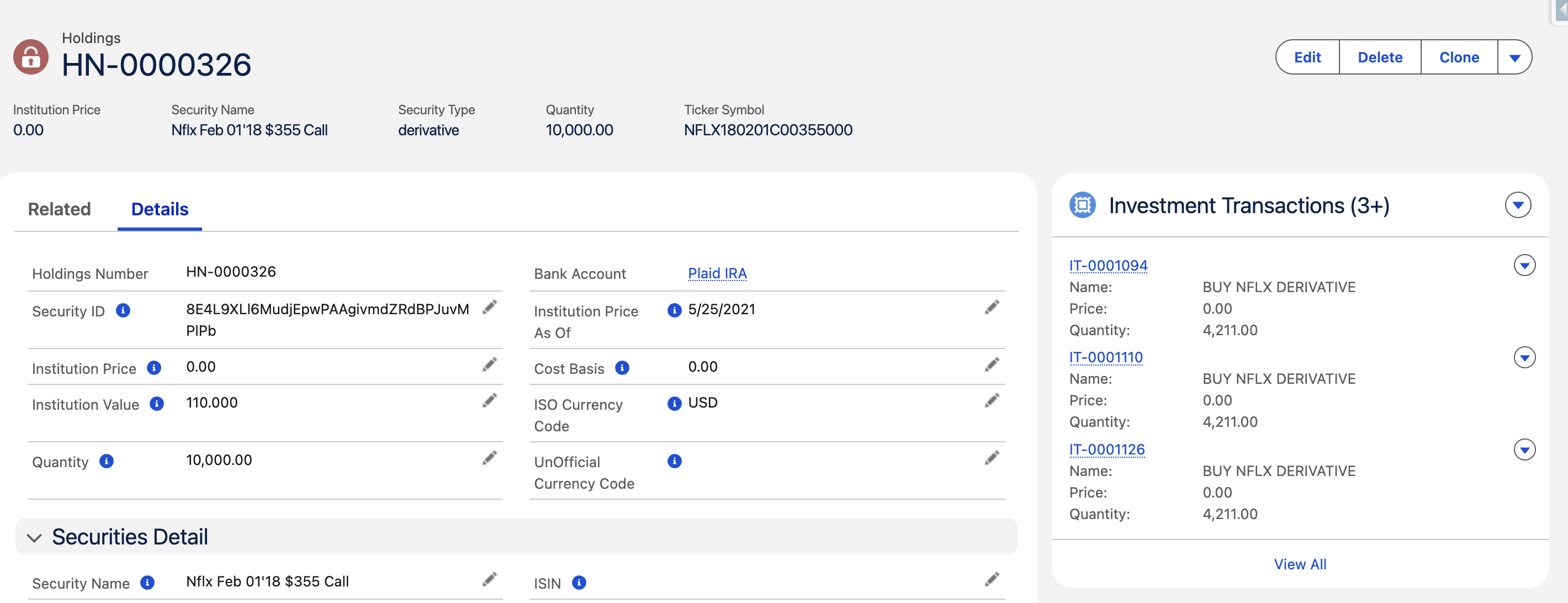
This enables users to gain insight into the composition and value of investment portfolios for analysis, reporting, or compliance purposes.
5.4 View Investment Transactions
We can retrieve up to 24 months of user-authorized transaction data for investment accounts.
Transactions are returned in reverse-chronological order, and the sequence of transaction ordering is stable and will not shift.
Steps to View Investment Results
To view Investment Transactions details:
-
Navigate to the Bank Account record.
-
In the Related section, find the list of Holding records tied to the account.
-
Click on any Holding record to open and review the details of the securities held, including security name, type, quantity, market value, and other institution-provided data.
-
Click on any Investment Transaction record to open and view its details, including trade date, settlement date, transaction type (e.g., buy, sell, dividend), quantity, price, and total value.
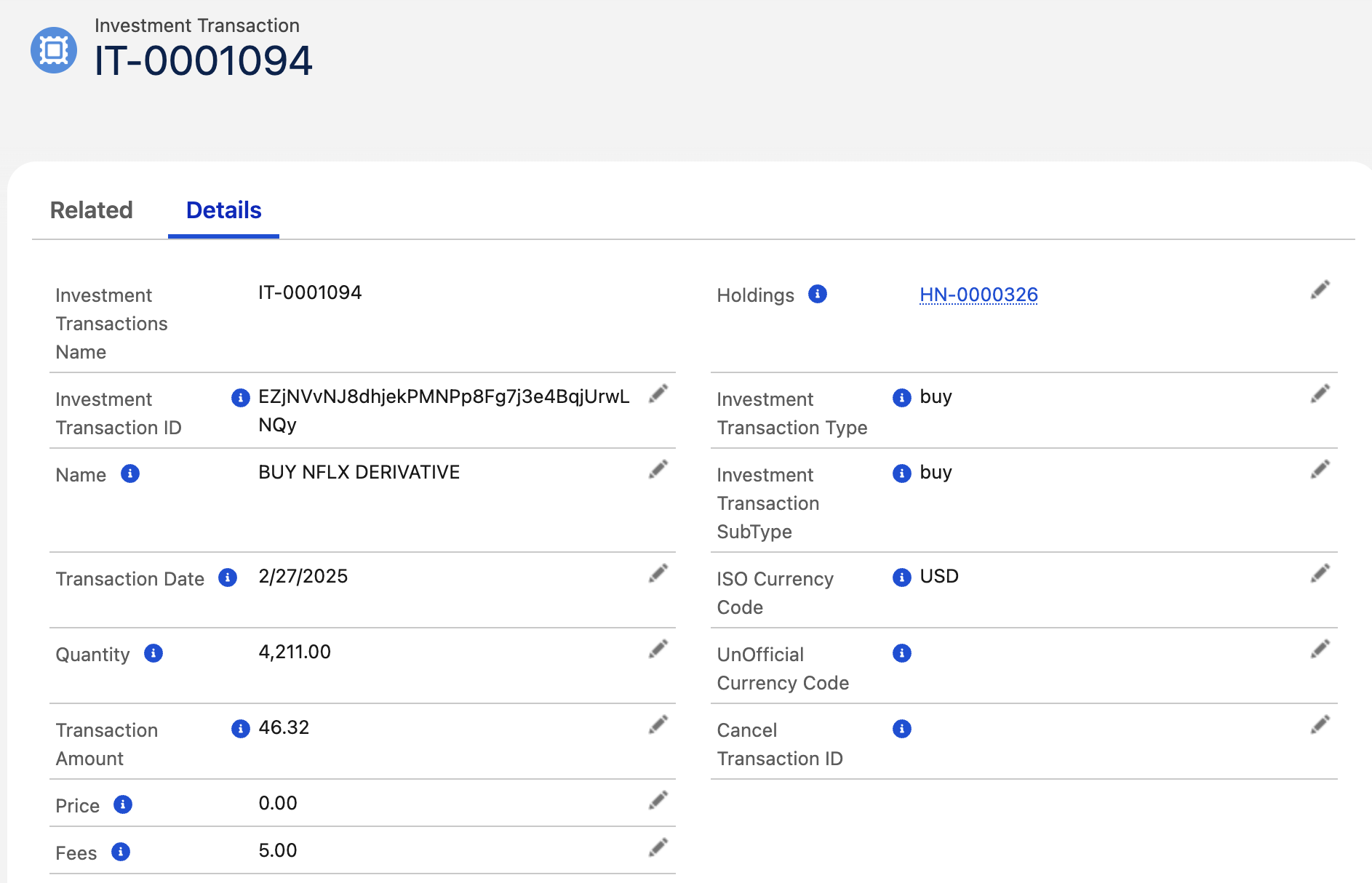
This allows users to track and analyze all transactions impacting the investment, supporting portfolio monitoring, performance evaluation, and compliance reporting.
6. Identity Results
Steps to View Identity Results
Results are captured in below objects:
-
Bank verification
-
Bank Account
-
Owner
-
Owner Addresses
-
Owner Contact Details
6.1 In the Related section of the Bank Verification Record, View the Bank Account Record
6.2 View Bank Account Details
The Available Balance represents the amount of funds that can be withdrawn from the account, as determined by the financial institution. This value is provided by the institution and may vary based on account type:
-
Credit Accounts – The available balance is generally calculated as:
Credit Limit – Current Balance – Pending Outflows + Pending Inflows
This represents the remaining credit available for use after accounting for purchases, payments, and transactions in progress. -
Depository Accounts (e.g., checking or savings) – The available balance is typically:
Current Balance – Pending Outflows + Pending Inflows
It does not include any overdraft limit. This reflects the actual cash accessible for withdrawal, excluding funds reserved for pending transactions. -
Investment or Brokerage Accounts – For investment-type accounts (or brokerage accounts in API versions 2018-05-22 and earlier), the available balance equals the total cash available to withdraw as reported by the institution.
Important:
Not all financial institutions calculate or provide an available balance. In such cases, the available balance will be returned as null in the system.
6.3 View Owners
Navigate the the Owners records in the Related Section of the Bank Account
The Account Owner Information section contains details provided by the financial institution regarding the individual(s) or entity that owns the account.
-
For personal accounts, this typically includes the account holder’s legal name.
-
For business accounts, the reported name may be either:
-
The name of the business entity, or
-
The name of the individual associated with the account,
depending on how the financial institution records the ownership.
-
To capture Owner Address and Owner Contact Details, we have seperate objects related to the Owner object.
7. Liabilities Results
Steps to View Liabilities Results
Results are captured in below objects:
-
Bank Verification
-
Bank Account
-
Liabilities
-
Annual Percentages
7.1 In the Related section of the Bank Verification Record, View the Bank Account Record
7.2 View Bank Account Details
The Available Balance represents the amount of funds that can be withdrawn from the account, as determined by the financial institution. This value is provided by the institution and may vary based on account type:
-
Credit Accounts – The available balance is generally calculated as:
Credit Limit – Current Balance – Pending Outflows + Pending Inflows
This represents the remaining credit available for use after accounting for purchases, payments, and transactions in progress. -
Depository Accounts (e.g., checking or savings) – The available balance is typically:
Current Balance – Pending Outflows + Pending Inflows
It does not include any overdraft limit. This reflects the actual cash accessible for withdrawal, excluding funds reserved for pending transactions. -
Investment or Brokerage Accounts – For investment-type accounts (or brokerage accounts in API versions 2018-05-22 and earlier), the available balance equals the total cash available to withdraw as reported by the institution.
Important:
Not all financial institutions calculate or provide an available balance. In such cases, the available balance will be returned as null in the system.
7.3 View Liabilities Details
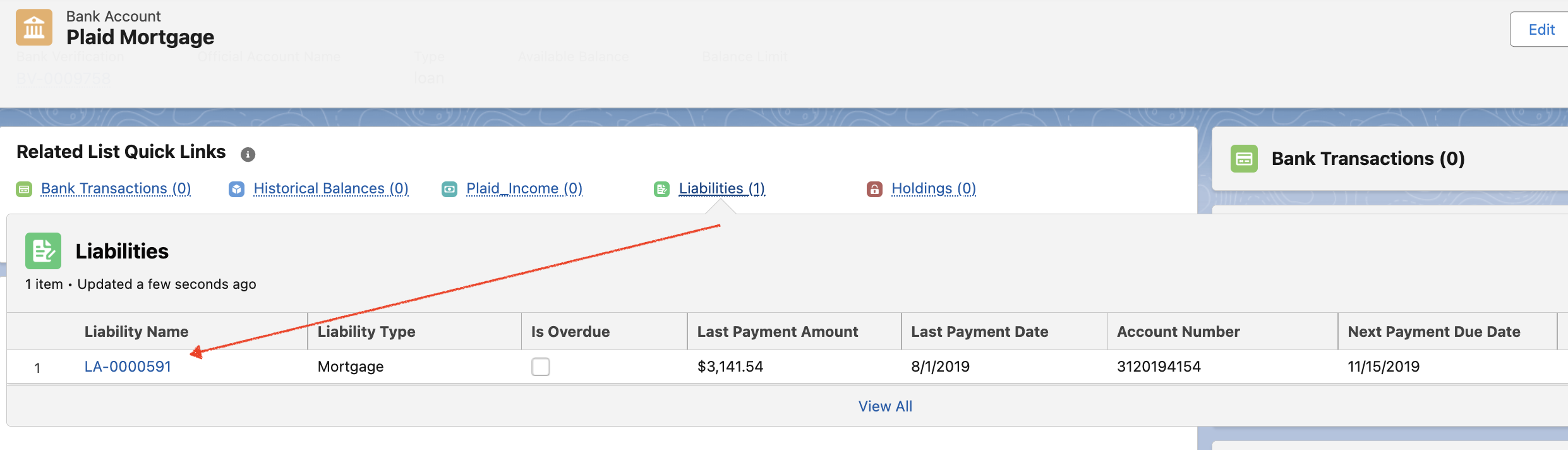
To access and review liabilities retrieved through Plaid:
-
Navigate to the Bank Account record.
-
In the Related section, locate the list of Liabilities records linked to the account.
-
Click on any Liability record to open and review its details, such as liability type (e.g., loan, credit card, mortgage), outstanding balance, minimum payment, due date, and interest rate.
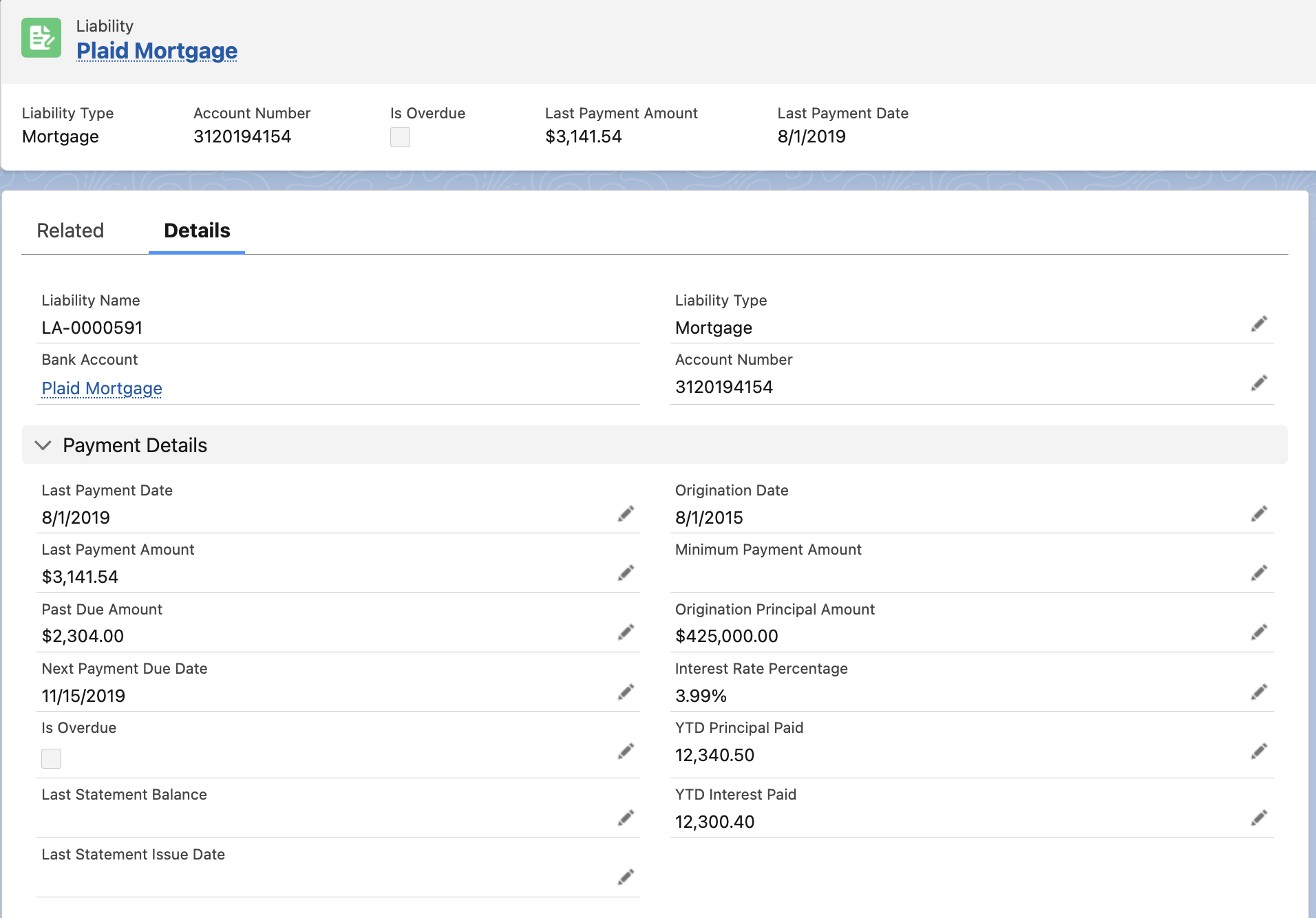
This feature allows users to gain a comprehensive view of an account holder’s outstanding obligations, enabling better financial assessment, risk evaluation, and decision-making.
7.4 Annual Percentages
8. Statements Results
Steps to View Statement Results
Results are captured in below objects:
-
Bank Verification
-
Bank Account
-
Plaid Statements
8.1 In the Related section of the Bank Verification Record, View the Bank Account Record
8.2 View Bank Account Details
The Available Balance represents the amount of funds that can be withdrawn from the account, as determined by the financial institution. This value is provided by the institution and may vary based on account type:
-
Credit Accounts – The available balance is generally calculated as:
Credit Limit – Current Balance – Pending Outflows + Pending Inflows
This represents the remaining credit available for use after accounting for purchases, payments, and transactions in progress. -
Depository Accounts (e.g., checking or savings) – The available balance is typically:
Current Balance – Pending Outflows + Pending Inflows
It does not include any overdraft limit. This reflects the actual cash accessible for withdrawal, excluding funds reserved for pending transactions. -
Investment or Brokerage Accounts – For investment-type accounts (or brokerage accounts in API versions 2018-05-22 and earlier), the available balance equals the total cash available to withdraw as reported by the institution.
Important:
Not all financial institutions calculate or provide an available balance. In such cases, the available balance will be returned as null in the system.
8.3 View Plaid Statements
To access and review bank statements retrieved through Plaid:
-
Navigate to the Bank Account record.
-
In the Related section, locate the list of Plaid Statement records linked to the account.
-
Click on any Plaid Statement record to open it.
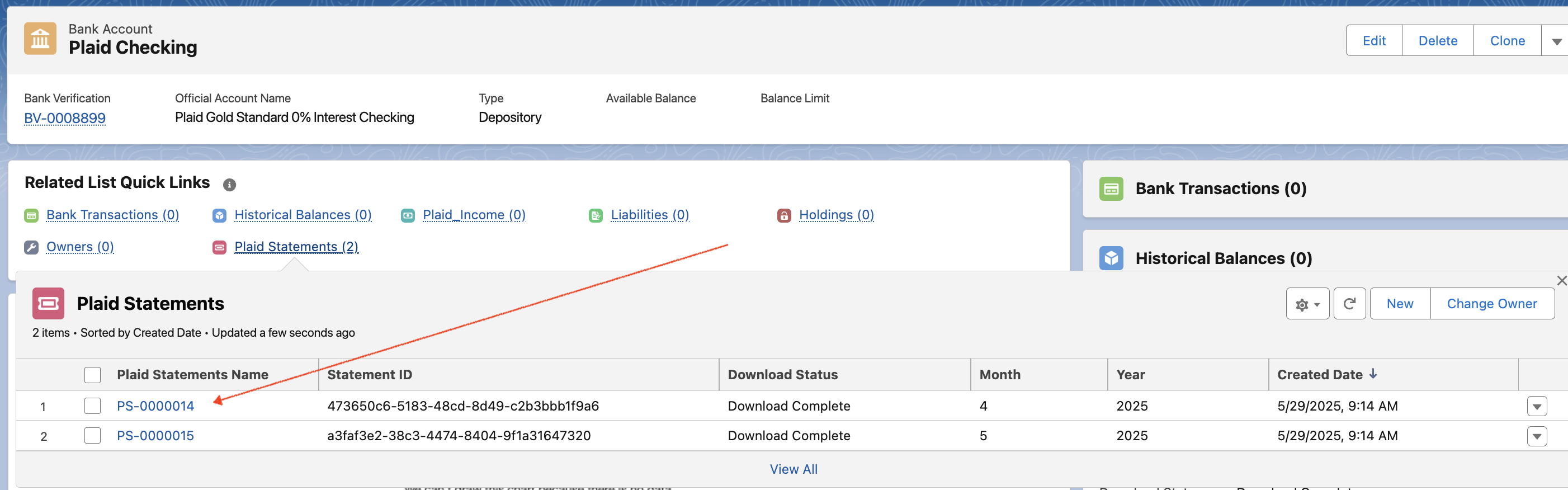
-
Within the record, go to the Notes and Attachments section to view and download the PDF copy of the bank statement.
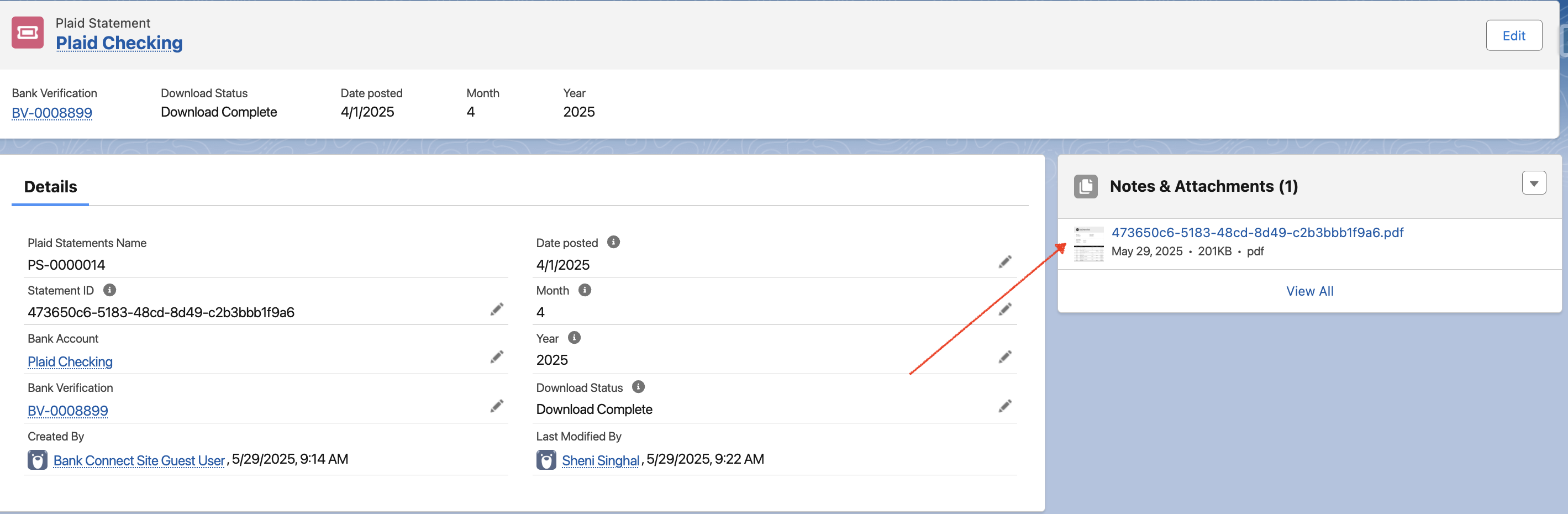
This provides users with direct access to official bank-issued statements for verification, reconciliation, audit, or compliance purposes—without needing to request them separately from the financial institution.
View Identity Verification Results
→ Please refer to the below page for detailed results
View Identity Verification Results
View Income Verification Results
→ Please refer to the below page for detailed results
View Income Verification Results